Skip to content
Allday Allshopping

Sales channels

Reach open markets and product feeds

Install a connector from the extension market and link your channel account: listings go out and orders come back into the same order and settlement flow. Each connector shows exactly how far its live integration has been verified.

Orders every 5 minutes
The default; each account can use anything from 1 minute to 1 hour
Price and stock per option
Price-policy and stock changes reach the channel automatically
No fee on your own accounts
Orders from channels you connected yourself are settled by that channel
3-step connection test
Connection check → dry run → a test listing that isn't on sale

Features

Sales channels in the partner center

What a connector does

Coverage differs per channel, but the basic flow is the same.

  • Create and update listings; send price and stock per option
  • Per-channel pricing: priority rules, per-product exceptions, and prices worked back from fees
  • Collect orders → confirm → upload tracking numbers
  • Collect cancellation, return and exchange requests and send the outcome (supported channels only)
  • Channel category mapping and product information disclosure

Disclosure values in each channel's format

The product information disclosure values you entered (28 types) are converted into each channel's own format. For Naver, Gmarket, Auction and Lotte ON the items were matched one by one against each channel's published developer documents and code lists; for Coupang and SSG the disclosure items of the category are read from the channel at registration. Items with no match are sent as ‘see detail page’.

Connection test

The ‘Connection test’ tab on the sales-channel screen checks a real seller account step by step.

  • Connection check: one sign-in and one read-only lookup; no products or orders are changed
  • Dry run: pick a product and build what would be sent to the channel without sending it, checking category mapping, required settings, loss-making prices and disclosure items, then showing errors, warnings and the request itself
  • Test registration: only with a dry run free of errors, and after typing the account name to confirm, one product is actually registered in a not-for-sale state (three per account per ten minutes). Naver and Coupang can delete it right away; on other channels you delete it in the channel's own admin
  • Test log: results and the exchanged content of each check, dry run and test registration, with secret values masked

Vendor products on sales channels

A host store can list vendor products on sales channels too, but this is off by default. The operations team must allow it for the platform, the host must allow it for all vendors or per vendor, and the vendor must consent.

  • Even for channel orders, the vendor ships its own products and enters the tracking number (passed on to the channel)
  • The channel settles those sales with the host, so the host settles with the vendor directly using the vendor channel-sales report (CSV)
  • If permission or consent is withdrawn, channel sales of that vendor's products stop automatically

Product feeds and file exchange

Create feed addresses that price-comparison and advertising services read, and for shops without an API, export products and import orders as Excel or CSV files.

Third-party connectors

Platforms Allday Allshopping did not build itself attach through the open connector protocol, which covers request signing, retries, timeouts and response validation.

When something fails

A channel account that keeps failing has automatic sync paused and the operator is emailed. Credentials are stored encrypted.

Orders that could not be imported

When a channel order cannot become an order because of low stock or an item that is not linked, it stays under ‘orders not imported’, with a count on the dashboard and in the sales channel list.

  • Fix the cause (link the option, add stock) and it is imported again automatically, or import it right away with ‘Retry’
  • If you handled it in the channel's seller center, close it with ‘Handled manually’
  • Buyer contact details are not shown in this list; once imported, the order appears in the order list as usual

AI main images

Turn one product photo into main images that follow each channel's rules. For marketplaces and ad feeds the background is removed and the product alone is fitted on white at the channel's size; for your own store and social posts you can add backgrounds, shadows and short badges. The product itself is never redrawn: the cut-out of the original photo is used as is, and every result is checked automatically (size, background, product share, text) so that results below the standard cannot be set for a channel. Background removal runs on our servers without any external key; AI-generated backgrounds are used only when connected. Usage is paid from prepaid AI credits. Some per-channel numbers still need to be confirmed against each seller guide.

Connectors published now

Read directly from the service: the connectors published in the extension market. Verification status differs per connector. Names and descriptions below come from the service and are in Korean.

Open markets and shop platforms 10

  • 11번가

    11번가 셀러 오픈 API로 상품·주문·송장을 연동합니다

    Not verified live

  • G마켓·옥션 (ESM)

    ESM Trading API로 G마켓과 옥션에 함께 판매합니다

    Not verified live

  • SSG닷컴

    SSG.COM 파트너 API로 상품·주문·송장을 연동합니다

    Not verified live

  • Shopify

    Shopify 스토어에 상품을 보내고 주문·배송 정보를 주고받습니다

    Not verified live

  • eBay

    eBay 에 상품을 올리고 주문·배송 정보를 주고받습니다

    Not verified live

  • 네이버 스마트스토어

    스마트스토어에 상품을 올리고 주문·송장을 자동으로 주고받습니다

    Not verified live

  • 롯데온

    롯데ON 오픈 API로 상품·주문·송장을 연동합니다

    Not verified live

  • 카카오톡 스토어

    카카오톡 스토어 판매자 API로 상품·주문·송장을 연동합니다

    Not verified live

  • 카페24

    카페24 쇼핑몰에 상품을 보내고 주문·송장을 주고받습니다

    Not verified live

  • 쿠팡

    쿠팡 WING 오픈 API로 상품·주문·송장을 연동합니다

    Not verified live

Product feeds 4

  • 구글 머천트 센터

    구글 쇼핑·쇼핑 광고용 상품 피드(RSS 2.0, g: 네임스페이스)를 제공합니다

    Verified

  • 네이버 쇼핑 EP

    네이버 쇼핑 상품 DB URL(EP 3.0)을 만들어 가격비교에 노출합니다

    Verified

  • 메타 카탈로그 (페이스북·인스타그램)

    페이스북·인스타그램 샵과 카탈로그 광고용 데이터 피드(CSV)를 제공합니다

    Verified

  • 카카오 쇼핑하우

    쇼핑하우 상품 DB(EP) 피드를 제공합니다

    Verified

File exchange 1

  • 엑셀·CSV 연동 (기타 쇼핑몰)

    API가 없는 쇼핑몰도 상품 파일 내보내기·주문 파일 가져오기·송장 파일 내보내기로 연결합니다

    Verified

Not verified live
Not confirmed with a real seller API key. Only verified end to end in simulation mode.
Verified
Verified end to end within what can be checked without external keys (format, export, import).
5 things to know
  • Connectors marked ‘Not verified live’ below have not been confirmed with a real seller API key for listing and order collection. Only the end-to-end flow in simulation mode has been verified; each channel needs checking before going live.
  • In simulation mode external calls are imitated while listing and order records are really created. The screen always shows that it is a simulation.
  • Amazon, Shopee, Lazada and Qoo10 connectors are not provided.
  • Sales channels offer no public test environment, so connection tests run on your real seller account. Depending on the channel's policy, a test product may be briefly visible or leave a record.
  • 11st's disclosure format could not be confirmed from public documents, so for items other than farm and fishery products a disclosure type code must be entered in the connection settings before listing.

See it on screen

Real partner-center screens with example data. The numbers match the notes below.

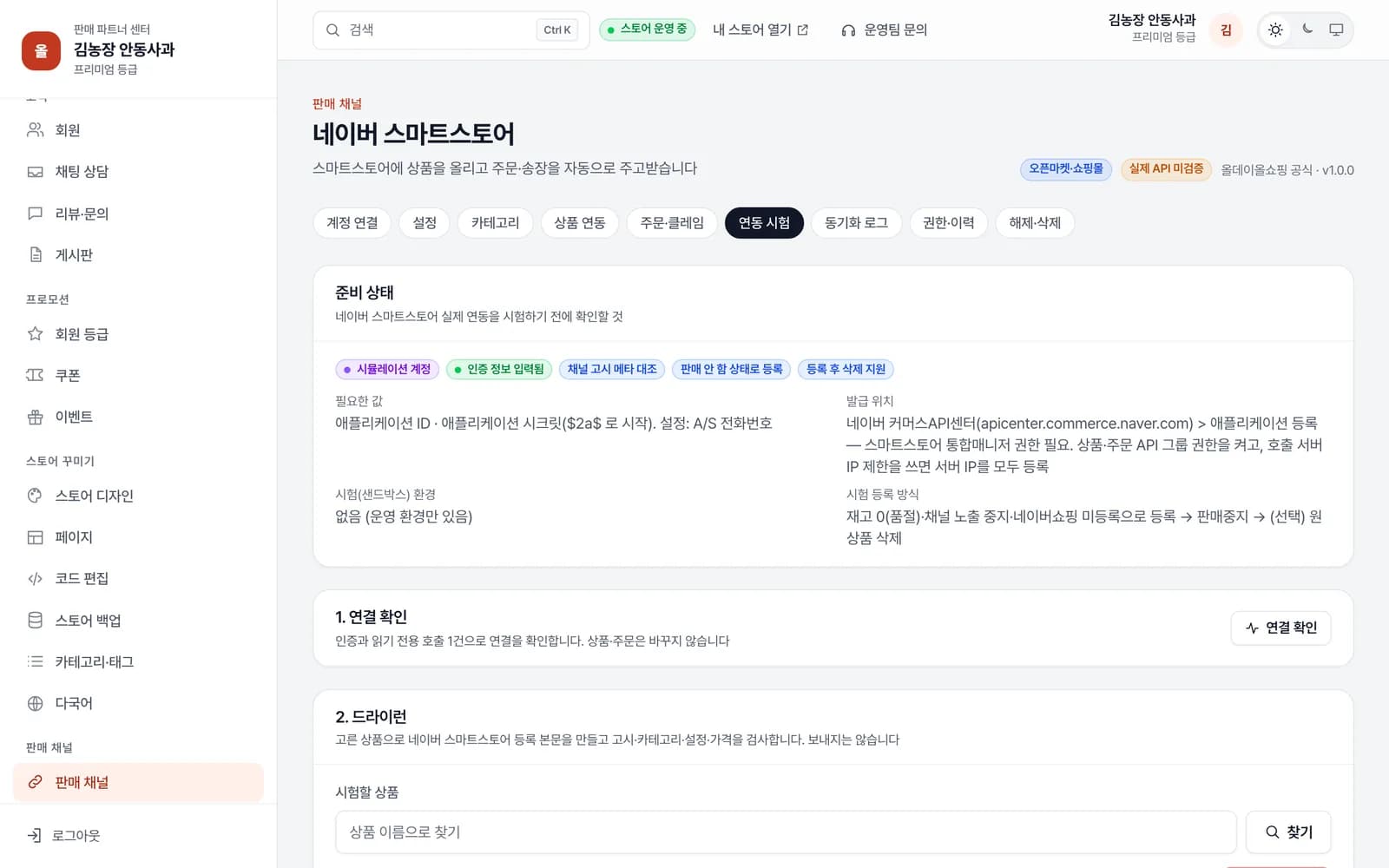
The connection test tab of the Naver Smart Store channel: 'real API not verified' label, channel menu, readiness, connection check and dry run
  1. Verification status — Each connector shows exactly how far it has been verified with a real seller API. This one is 'real API not verified'.
  2. Channel menu — Account, settings, categories, listings, orders and claims, connection test, sync log, permissions and history, disconnect — all on one screen.
  3. Readiness — Lists the values you need (application ID, secret and so on), where to issue them, and how test listings work for this channel.
  4. 1. Connection check — Signs in and makes one read-only call. Products and orders are not touched.
  5. 2. Dry run — Builds what would be sent for a chosen product and checks disclosure, category, settings and price — without sending anything.
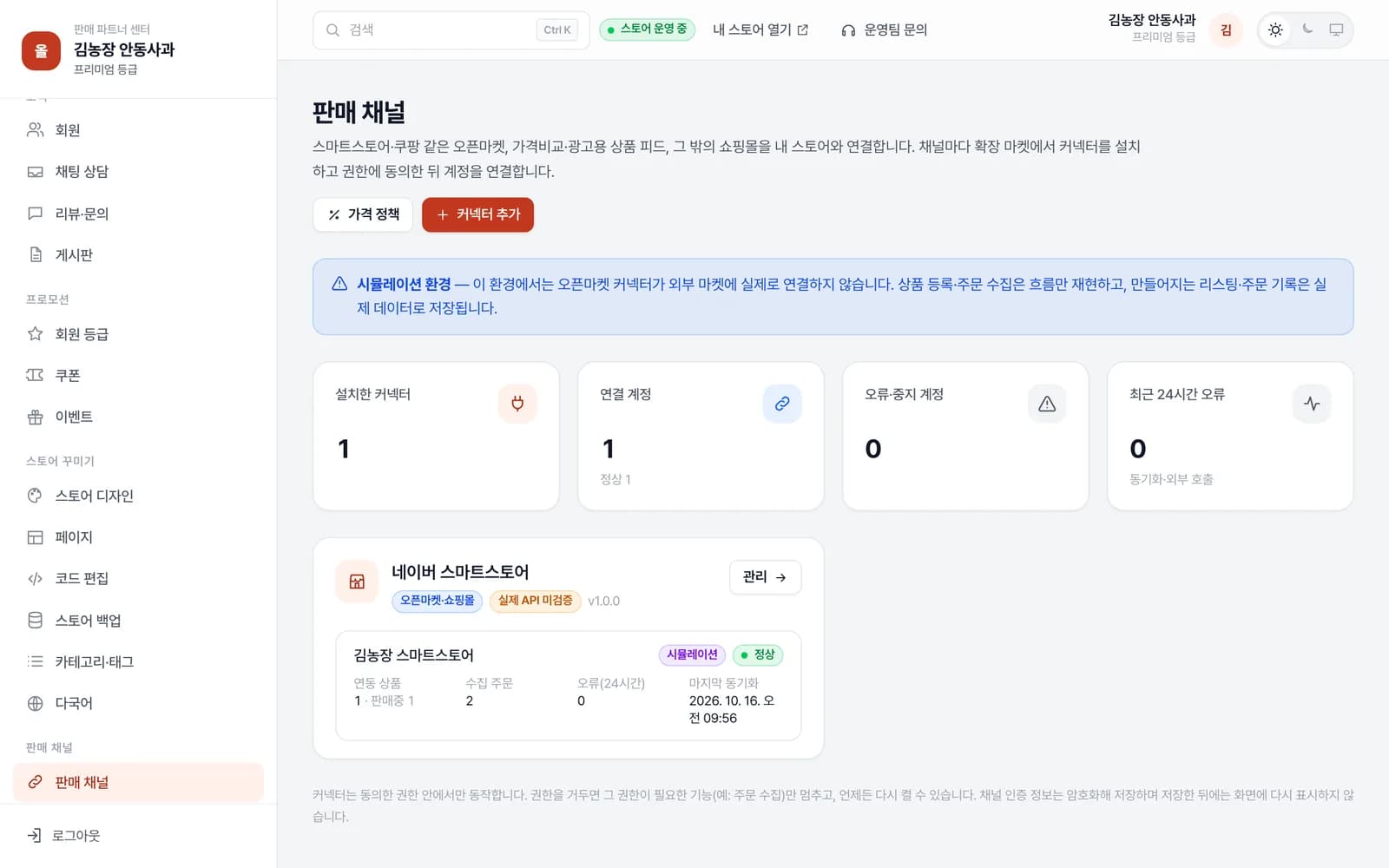
The list of sales channels in the partner center

How you use it

Step by step, using the real menu names.

List one new product on the marketplace, Naver and Coupang at once

  1. Connect — install the Naver Smart Store and Coupang connectors from the extension market and enter the application ID and secret from Naver's Commerce API Center and the vendor code, access key and secret key from Coupang WING
  2. Connection check — confirm authentication with a read-only call on the connection test tab
  3. Categories — map your product categories to the channel's categories once
  4. List — save the product with marketplace visibility, then use 'list on channel' in the product list for both channels; disclosure values are converted to each channel's format
  5. Afterwards — stock and price changes reach the channels automatically, and orders come into the partner center every 5 minutes

Result: One product sells in three places with one stock count, and orders, tracking and claims are handled in the partner center.

Charge different prices per channel

  1. Channel price policies — create priority rules and per-product exceptions
  2. Fee-aware pricing — work back from the amount you want to receive to a selling price that covers the channel fee
  3. Loss check — the dry run warns about prices below cost
  4. Apply — pick the policy in the account settings and it is used only for prices sent to that channel

Result: Your marketplace price stays as it is while each channel gets its own.

Side by side

Fees, shipping, settlement and refunds by where you sold

Fees, shipping, settlement and refunds by where you sold
MarketplaceMy storeExternal channel (your own account)External channel (platform account)
PaymentAllday Allshopping checkoutAllday Allshopping checkoutThat channelThat channel → Allday Allshopping
Platform sales feeMarketplace rate of your gradeMy-store rate of your gradeNoneExternal-channel rate of your grade
ShippingYou shipYou shipYou ship (tracking sent to the channel)You ship
SettlementAllday Allshopping statementAllday Allshopping statementThe channel pays you directly (not on your statement)Allday Allshopping statement
RefundsAutomatic to the payment methodAutomatic to the payment methodOn that channelOn that channel
Where orders are handledPartner centerPartner centerPartner center (labelled 'settled by channel')Partner center

The rates are shown with current settings in the grade table on the fees page. Whatever the external channel charges follows your contract with it.

Frequently asked questions

See all questions

How do I connect Naver or Coupang?

Install the connector from the partner center's extension market, agree to its permissions and connect your channel account. Naver needs the application ID and secret from the Commerce API Center; Coupang needs the vendor code, access key and secret key from WING. The screen tells you where to issue each value. Then run the connection check and a dry run on the connection test tab.

Do orders from my own Smart Store carry a fee?

No. Orders from a channel account you connected yourself are settled by that channel, so there is no Allday Allshopping fee, payment fee or settlement. They still come in for shipping, stock, claims, inquiries and analytics, labelled 'settled by channel'.

Which channels can I connect?

The 'Connectors published now' list higher up this page shows what is published in the extension market today: open markets, overseas stores (Shopify, eBay), product feeds and file exchange, each with how far its live integration has been verified. Amazon, Shopee, Lazada and Qoo10 are not offered.

What does 'real API not verified' mean?

That listing and order collection have not been confirmed end to end with a real seller API key. Running end to end in simulation mode has been confirmed. That is why we suggest running the connection test with your real account first.

How often do orders come in?

Automatic order collection runs every 5 minutes by default and can be set between 1 minute and 1 hour per account. Customer inquiries are collected every 10 minutes by default.

Is stock tracked separately per channel?

No. There is one stock count per option, and changes are pushed to connected channels automatically (you can turn this off). It helps avoid overselling.

Are cancellations and returns from channels handled?

For supported channels, requests are collected into the claims inbox and your decision is sent back. Naver supports cancellations, returns and exchanges; Coupang cancellations and returns; 11st cancellation and return approval. The refund itself is made by the channel.

Does a test listing go on sale?

It creates one real listing in a not-for-sale state (three per account every 10 minutes). On Naver and Coupang it can be deleted right after; on other channels delete it in the channel's own admin. Depending on channel policy it may be briefly visible or leave a record.

What if a connection keeps failing?

After repeated failures, automatic sync for that account pauses and you are emailed. The sync log shows why, and the AI assistant can explain the error in plain words. Credentials are stored encrypted.

Not sure where to start?

Pick what you want to do and we will point you to the right application. Ask the support desk if anything is unclear.