Designer guide
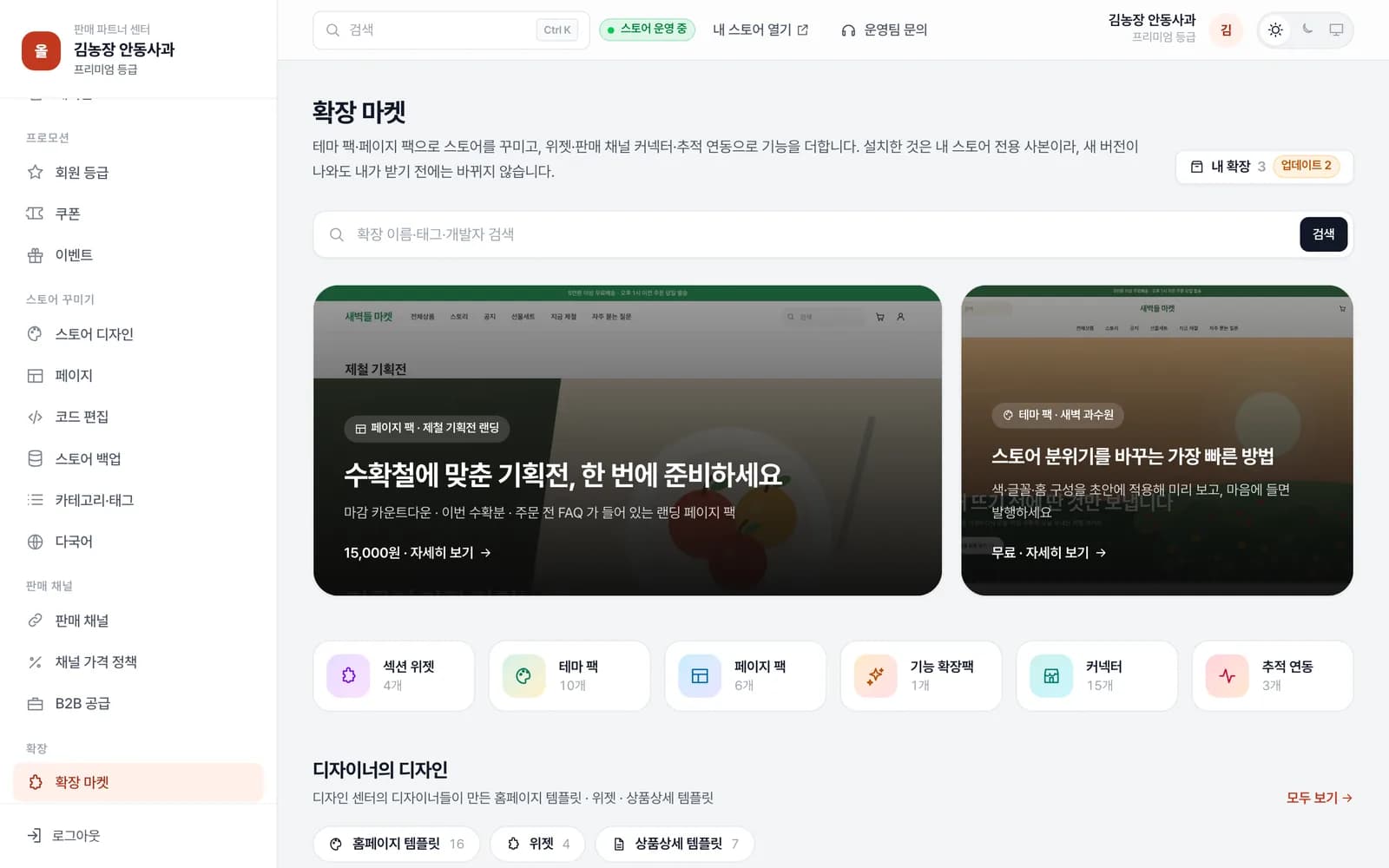
Design store looks without code and sell them in the market
Designers use the design center to make homepage templates (theme packs and page packs), section widgets and product-detail templates while looking at the result, and publish them in the extension market. No coding is needed, and an optional code mode is there for fine-tuning. When store operators install or buy a design, the sale is settled to the designer.
Who this is for
- Web and UI designers who design shop and brand screens
- Designers and studios who have made product detail pages
- Developers already on Allday Allshopping who also want to sell design work
How it works
Step 1
Submit the application
Enter your account, designer (studio) name, designer address, portfolio link and what you want to make. If you already have a Allday Allshopping account, apply with it.
Step 2
Review by the operations team
The operations team checks your portfolio and introduction and emails the result. If it is rejected, the reason is included and you can fix it and resubmit under the same application number.
Step 3
Make it in the design center
Once approved, sign in to the design center to make themes, pages, widgets and product-detail templates, and preview them on a sample store of your choice: general, fashion, living, farm produce, seafood or purchasing agent.
Step 4
Automatic checks and review
A submission first passes automatic checks and is then reviewed by the operations team. Approval and rejection are emailed, and rejection reasons are shown item by item in the design center.
Step 5
Publish and sell
Once published, it appears in the extension market marked "Designer", and store operators preview it in the partner center before installing.
Step 6
Settlement
Paid sales, net of the market fee, are grouped into a statement for each settlement period and paid to the account registered in the design center.
What you can do once approved
Homepage templates
Set colours, fonts, corners and spacing in the theme designer, which checks text-to-background contrast as you go. Lay out pages in the page composer with the same blocks real Allday Allshopping stores use, and publish them as theme packs and page packs.
Widgets
In the widget builder, pick blocks and connect the inputs store operators may change (text, images, colours and so on) to make a section widget.
Product-detail templates
Turn the structure and look of a product detail page into a template. Store operators decorate product detail pages with the templates they install.
Preview on real stores
Lay the design you are working on over the products of the sample stores (six kinds: general, fashion, living, farm produce, seafood and purchasing agent), and see how it will look in a store before publishing. Sample stores are not open to customers.
Asset library and licences
Upload the images a design uses to the asset library together with their licence and attribution. Licences that require attribution cannot be uploaded without the attribution text.
Code mode (optional)
Use code mode to fine-tune details when you want to. The result is a declarative design, so scripts are rejected by the automatic checks.
Setting a price
Distribute for free or set a price within the range and steps the platform sets (the current range is under 'Price' in the costs below). A purchase is a one-time payment per store.
Reviews, sales analytics and statements
Reply to reviews of your designs, and see sales and install analytics and the statement for each settlement period in the design center. Settlement works the same way as for developers.
Designs published now
Filter the extension market by "Designer" to browse the designs on sale today.
AI assistant
The Design Center AI assistant suggests theme colors and fonts from photos, writes market listing copy and page layout drafts applied only to your own design (sample store), and checks text contrast. Questions are free daily; generation is charged to your prepaid AI credits.
The design center
Approved designers sign in to the design center with the account created at application to make, submit, and follow sales and settlement.
Working alongside developers
One account can hold both roles. Applying with a developer account adds the designer qualification, and a designer can later apply as a developer. Sales-channel connectors, extension apps, API keys, webhooks and commissioned work are for developers only.
What you need to apply, and the review
Fields and documents come from the same definitions as the real application form.
- An email and password for sign-in (your existing Allday Allshopping account if you have one)
- Designer (studio) name and a short address in Latin letters
- A link to a portfolio of your work
- What you want to make: at least one of homepage templates, widgets and product-detail templates
- Business registration number (optional)
| Item | Required? |
|---|---|
| Business registration number | Optional (if you have one) |
No documents to submit.
How the review works
The Allday Allshopping operations team reviews it. The result is sent to the email you applied with, and in the meantime you can check progress with your application number on the status page.
Received → under review (missing documents can be added) → approved or rejected → if rejected, read the reason and resubmit under the same number
Day one · week one
What you get on day one
- The design center (the account you applied with)
- Preview on sample stores: general, fashion, living, produce, seafood and purchasing agent
- An asset library that records licence and attribution
First-week checklist
- Set colours, fonts, corners and spacing in the theme designerText and background contrast is checked as you go
- Lay out a home page in the page builder
- Preview it on a sample store
- Set a priceFree, or within the platform's price range (see the costs below)
- Register your payout account
- Submit → automatic check and review
The checkboxes are for guidance; the actual work happens in the console.
Cost
- Registration fee
- There is no such fee item. Free designs are distributed without a fee.
- Market fee
- 20% of paid sales (platform setting, the same rate as for developers). An individual contract rate takes precedence.
- Payment (PG) fee
- 2.9% of paid sales is also deducted at settlement.
- Price
- Free or ₩1,000–₩300,000 (₩100 steps), set by the designer.
- Settlement
- Sales net of the fee are grouped into a statement for each settlement period and paid to the account registered in the design center.
Numbers are read directly from the operating settings. See all fees
Worked example
- One ₩10,000 design sold
- ₩10,000 − market fee ₩2,000 (20%) − payment fee ₩290 (2.9%) = ₩7,710
The same formula the settlement service uses for extension sales. Free designs carry no fee.
Do I need to know how to code?
No. Themes, pages, widgets and product-detail templates are all made by choosing and arranging on screen. Code mode is optional.
How much is the market fee?
The platform's market fee rate applies to paid sales. It is the same rate as for developers, and free designs carry no fee.
How is this different from a developer?
Designers make declarative designs only (homepage templates, widgets and product-detail templates). Sales-channel connectors, extension apps, API keys and webhooks, and commissioned store work are for developers only.
I already have a developer account.
Submit the designer application with the same email and password and the designer qualification is added to that account. Your payout account and sales analytics carry over.
Can I use images I got elsewhere?
Only images you have the right to use. Record the licence and attribution when uploading to the asset library; licences that require attribution must include the text.
Can individuals apply?
Yes. The business registration number is optional.
What comes out of a sale?
As for developers, the market fee and the payment fee; the rest is grouped into the statement for each settlement period and paid. The worked example below uses the current settings.
What if my design is rejected?
See the reasons item by item in the design center, fix them and resubmit. Approval and rejection are also emailed.
Designer applications are filed online
You receive an application number by email and can follow progress on the status page. If an application is returned, you can correct it and resubmit under the same number.