Skip to content
Allday Allshopping

Languages and overseas

Sell in seven languages

Turn on the languages your store uses and translate right in the product form's language tabs. Anything left untranslated falls back to English or the Korean original, so you don't have to fill everything at once. Once the operations team opens international shipping, overseas orders come in with per-zone shipping rates and foreign-currency payment.

7 languages
Korean, English, Japanese, Chinese (Simplified and Traditional), Vietnamese, Thai
Empty fields fall back
Customer's language → English → Korean, field by field
Per-language addresses
With language tags for search engines
Settled in won
Even when a customer pays in a foreign currency, order amounts and settlement stay in won (₩)

Features

The seven supported languages, and the order used when a field has no translation

Customer-facing languages

  • ko한국어
  • enEnglish
  • ja日本語
  • zh-CN简体中文
  • zh-TW繁體中文
  • viTiếng Việt
  • thไทย

When a field is not translated

  1. The customer's language
  2. English
  3. Korean original

Chosen field by field: translate just the product name and that field shows translated.

Seven supported languages

Korean, English, Japanese, Chinese (Simplified), Chinese (Traditional), Vietnamese and Thai. Customer screens such as the cart, checkout and my page are fully available in all seven, with per-language addresses and search-engine language tags. On foreign-language pages the platform name appears in English (Allday Allshopping).

Translate in the product form

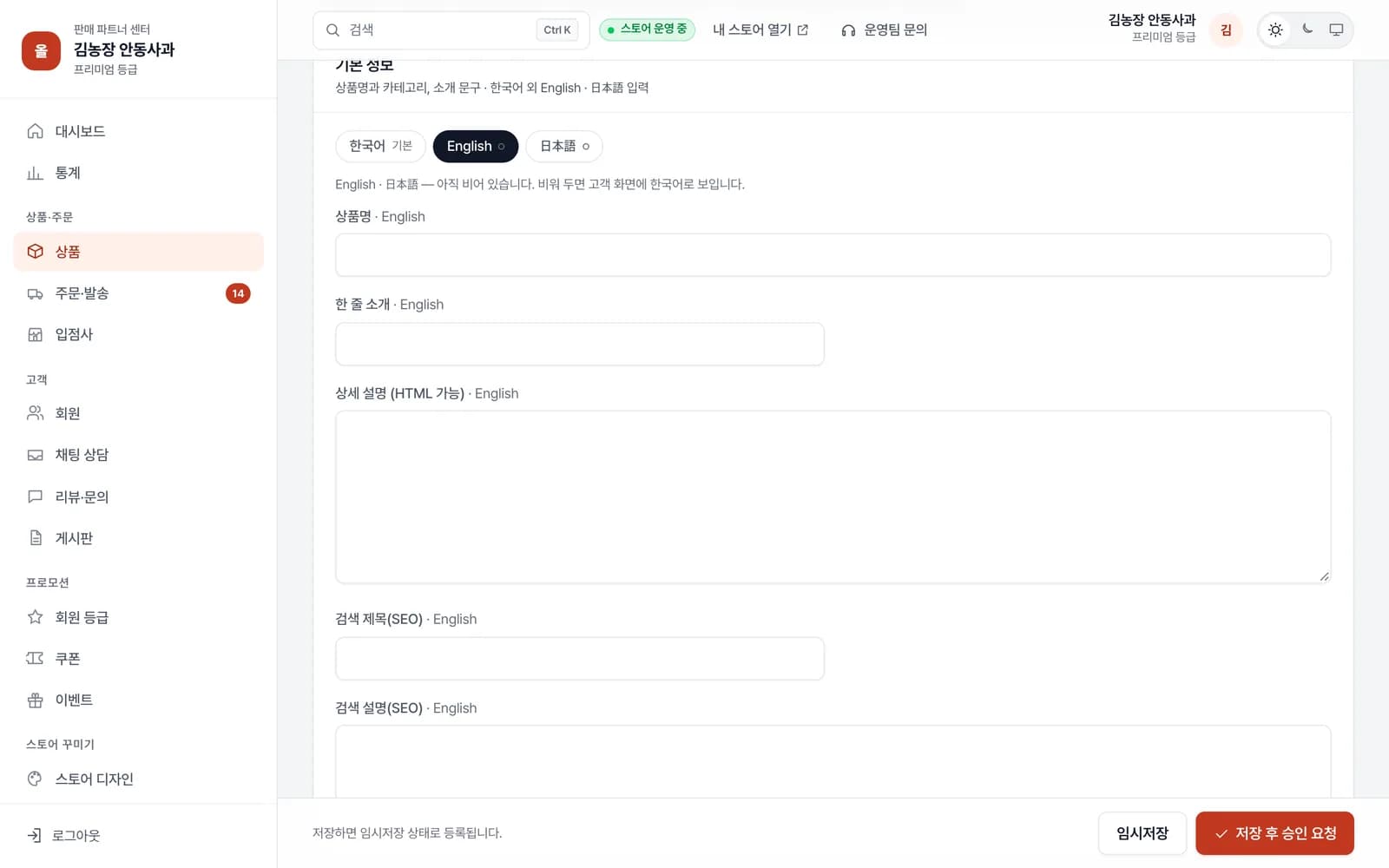
In the language tabs of the product form, enter the product name, one-line summary, description, and search title and description for each language. Option group names, option values (for example 색상 → Color, 블랙 → Black) and attribute values are translated on the same screen.

  • Names and descriptions of store categories, tags and boards per language too
  • A translations screen showing coverage per language for products, detail pages, categories, tags, boards, posts and store copy
  • Per-language columns such as name_en or summary_ja in Excel bulk upload
  • Optionally fill a draft with AI translation on the translation screen, then edit and save

AI translation, charged once

‘Translate with AI’ and ‘translate all empty languages’ in the language tabs fill only empty fields with a draft (your own translations change only if you choose to overwrite), which you check before saving. The number of new characters and the amount are shown before it runs, and translations are kept so the same source text is never charged twice. Several products' missing languages can be translated at once from the product list, paid from the store's free allowance and then prepaid credits.

When something is not translated

An untranslated field is shown in the customer's language → English → the Korean original, chosen field by field, so translating just the product name already shows that field translated.

Languages with few translations

If the share of products on sale with a translated name falls below the store's threshold (50% by default), the store chooses whether the language menu marks that language ‘partly translated’, hides it, or shows it as usual. The default language and the language being viewed are never hidden.

International shipping and foreign-currency payment

When the platform operator opens international shipping and a seller sets shipping zones (groups of countries) with rates (flat, weight bands or order-amount bands), an international courier and customs defaults, customers choose a destination country at checkout and order with an address in English. Duties and taxes are shown as paid by the recipient on arrival (DDU), and the seller prints a commercial invoice from the order screen (sender: the default ship-from address). Customers who pick a display currency in the header see an approximate amount next to prices (≈ $12.34, remembered on their account once signed in), and currencies the operator has enabled with a foreign-currency processor (PayPal: USD, JPY, TWD, THB, EUR) are charged and refunded in that currency. Settlement is in won whatever the currency.

  • Enter transit days per zone and an estimated delivery window appears on the product page, at checkout and on the order confirmation
  • With overseas return and exchange fees set, customers see the amount and who pays before requesting, and claims follow the policy at the time of the order
  • Sellers can exclude categories or products that are hard to send abroad, such as food or batteries
  • Orders from sales channels (open markets) are domestic only

Emails in the customer's language

Welcome, email verification, password reset, bank-transfer instructions, order confirmation, shipping and shipping-delay notices, cancellation/return/exchange and refund, restock alerts, inquiry answers, chat replies, event winners, membership grade changes and purchasing-agent progress and extra-payment emails go out in the language the customer used. English and Japanese texts exist today; other languages receive the English email. Amounts are in Korean won and times in Korea time.

Language tabs in the product form: Korean, English, Japanese
4 things to know
  • Emails exist in Korean, English and Japanese only. Chinese, Vietnamese and Thai customers receive the English email.
  • The Korean original of the terms and privacy policy prevails, and other language pages say so.
  • Prices are based on Korean won (₩). Foreign amounts use a reference rate, and only currencies with an enabled foreign-currency processor are charged in that currency. Duties and taxes on overseas shipping are paid by the recipient (DDU).
  • AI translation drafts work only when an AI provider is connected in the operating environment, and are paid from prepaid credits.

See it on screen

Real partner-center screens with example data. The numbers match the notes below.

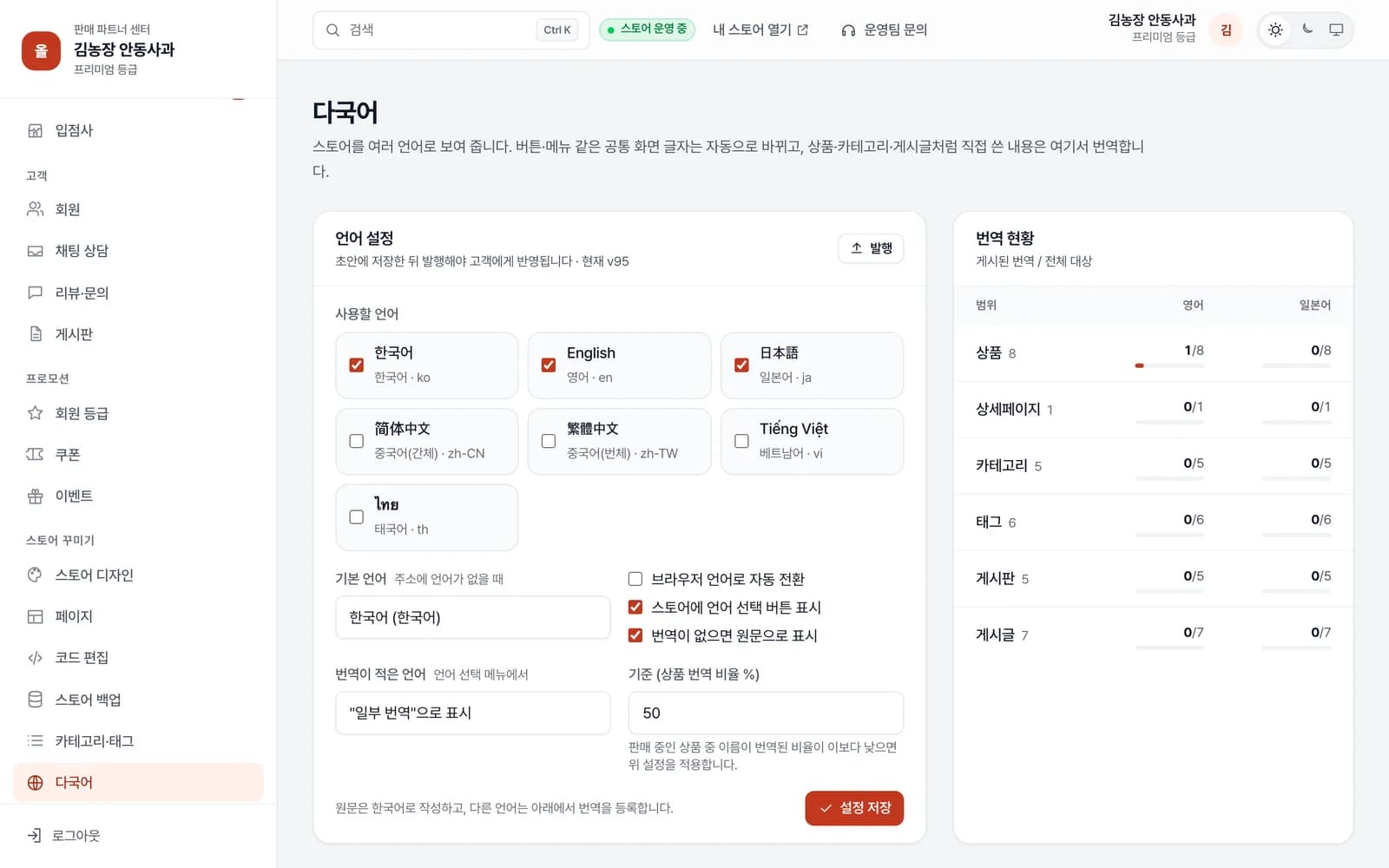
The languages screen in the partner center: choosing languages, default language, handling languages with few translations, and translation progress
  1. Languages in use — Turn on the languages your store uses. Shared interface text such as buttons and menus switches automatically; you only translate what you wrote, like products.
  2. Default language and switching — Choose the language when the address has none, automatic switching by browser language and whether to show a language picker.
  3. Languages with few translations — If fewer product names than the threshold (50% by default) are translated, show that language as 'partly translated' or hide it.
  4. Translation progress — See how many products, detail pages, categories, tags, boards and posts are translated per language.
  5. Publish — Language settings are saved to the draft too and reach customers when you publish.
Language tabs in the product form: Korean, English, Japanese
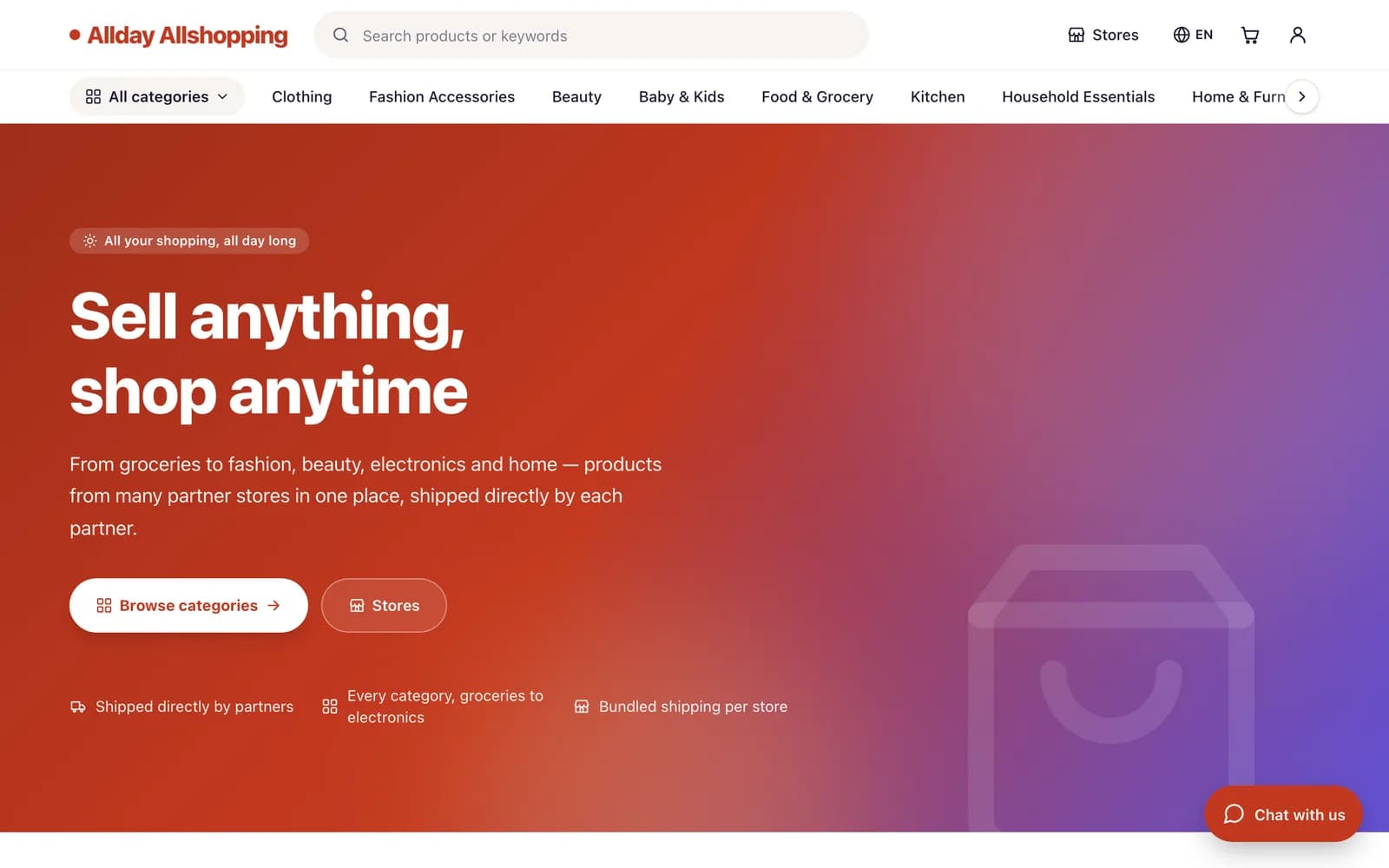
The Allday Allshopping marketplace front page in English

How you use it

Step by step, using the real menu names.

Take orders from English-speaking customers

  1. Languages — turn on English and publish
  2. Product › language tabs — starting with best sellers, write the product name, one-line summary and option names and values in English (an AI draft is available)
  3. Check — open the English pages with /en in your store address; untranslated fields show the Korean original
  4. Order — the customer pays in won, or in a foreign currency the operations team has enabled, and receives order and shipping emails in English
  5. Delivery — Korean addresses via postcode search; stores with international shipping turned on also take a destination country and an address in English

Result: Customers in Korea who prefer another language, and customers living abroad, can order from your store directly.

Turn on international shipping

  1. Shipping policies › international shipping: switch it on and create shipping zones (groups of countries)
  2. Rates — per zone choose flat, weight bands or order-amount bands, then set the free-shipping threshold, international courier, transit days and overseas return and exchange fees
  3. Customs defaults — set the content type, origin, default HS code and default weight, and exclude categories that are hard to send (food, batteries and so on)
  4. Products — only where needed, enter an HS code, weight and English name under product edit › international shipping
  5. When an order arrives — print the commercial invoice from the order details and enter the tracking number with an international courier

Result: Customers see an estimated delivery window on the product page and at checkout, and see the fee and who pays before requesting a return or exchange. The destination-country field appears only after the operations team opens international shipping for the platform.

Put your products on overseas marketplaces

  1. Connector — install the Shopify or eBay connector and connect your store account
  2. Currency and rate — set the selling currency (Shopify: KRW, USD, JPY, EUR, SGD; eBay: USD, GBP, EUR, AUD) and the won rate per unit
  3. Listing — prices are sent as won ÷ rate, and incoming order amounts are converted back to won at the same rate
  4. Upkeep — the rate does not update itself, so revise it regularly

Result: Customers pay on that channel in local currency while you handle orders in the partner center (both connectors are 'real API not verified').

Cost examples

Calculated from the current AI price table (VAT included). When the table changes, so does this.

Cost examples
If you do thisCalculationAmount
Translate 3,000 characters of product text (one language)₩40 × 3 (1,000자)₩120

See pricing

Frequently asked questions

See all questions

Which languages are supported?

Seven: Korean, English, Japanese, Chinese (Simplified), Chinese (Traditional), Vietnamese and Thai. Shared screens such as the cart, checkout and my page are fully available in all seven.

Do I need to translate everything at once?

No. A field without a translation falls back to the customer's language → English → the Korean original, so translating just product names first is fine.

How much is AI translation?

It is charged from prepaid credits per 1,000 characters of source text. The current rate is in the AI price table on the fees page and in the 'cost examples' below. Fill in a draft on the translation screen, edit and save.

Can customers abroad pay?

Yes. When a customer picks a display currency in the header, an approximate amount (≈) appears next to prices, and currencies the operations team has enabled for foreign-currency payment (USD, JPY, TWD, THB, EUR) are charged and refunded in that currency through PayPal. Other currencies are paid in won. Product prices, order amounts and settlement are always in won. You can also sell in a local currency on an overseas channel such as Shopify or eBay through its connector.

Can I ship abroad?

When the operations team has opened international shipping, set shipping zones, rates, an international courier and customs defaults under shipping policies › international shipping, and customers choose a destination country and order with an address in English. Duties and taxes are shown as paid by the recipient on arrival (DDU), and you print a commercial invoice from the order screen. Orders from sales channels (open markets) remain domestic only.

How are delivery estimates and return fees shown for overseas orders?

Enter transit days per zone and, added to your dispatch days, the product page, checkout and order confirmation show 'estimated delivery N–M days'. If you set overseas return and exchange fees, customers see the amount and who pays (the customer for a change of mind, the seller for damage or a wrong item) before they request, and claims follow the policy at the time of the order.

Are customer emails translated?

Sign-up, verification, password reset, bank-transfer notice, order, shipping and shipping-delay, cancellation/return/exchange and refund, restock, inquiry-answer, chat-reply, event-winner, grade-change, purchasing-agent progress and extra-payment emails go out in the customer's language. Korean, English and Japanese texts exist today; other languages receive English.

If I run AI translation again, am I charged again?

No. Translations are kept and reused while the source text is the same, so translating the same product again, or the same sentence in another product, is charged only the first time (within your store). Only fields whose source changed are charged, and the number of new characters and the amount are shown before you run it.

Are the languages visible to search engines?

Each language gets its own address and the page carries language tags (hreflang).

Are terms translated?

The Korean terms of use and privacy policy are authoritative, and other language screens say so.
Not sure where to start?

Pick what you want to do and we will point you to the right application. Ask the support desk if anything is unclear.