Purchasing agent guide
Run a store on Allday Allshopping that buys overseas goods on customers' behalf
A purchasing agent receives the same store as a seller partner, with the business model set to overseas purchasing agency. Product display, the order form and order stages change to fit that model.
Who this is for
- Businesses that buy overseas products for customers and ship them
- Sellers who want prices to reflect exchange rates and international shipping automatically
- Sellers who want to tell customers each customs and shipping stage
How it works
Step 1
Submit the application
In addition to the seller partner details, state the countries you buy from and attach your business registration certificate and mail-order business report certificate.
Step 2
Review by the operations team
On approval the store is created and its business model is set to overseas purchasing agency.
Step 3
Agency settings
Set exchange rates per currency, the agency fee (percentage or fixed per order), international shipping by weight band, and notices in the store.
Step 4
List products
Enter the local price and weight; the selling price is calculated with the exchange rate, fee, international shipping and estimated duties and VAT.
Step 5
Order progress
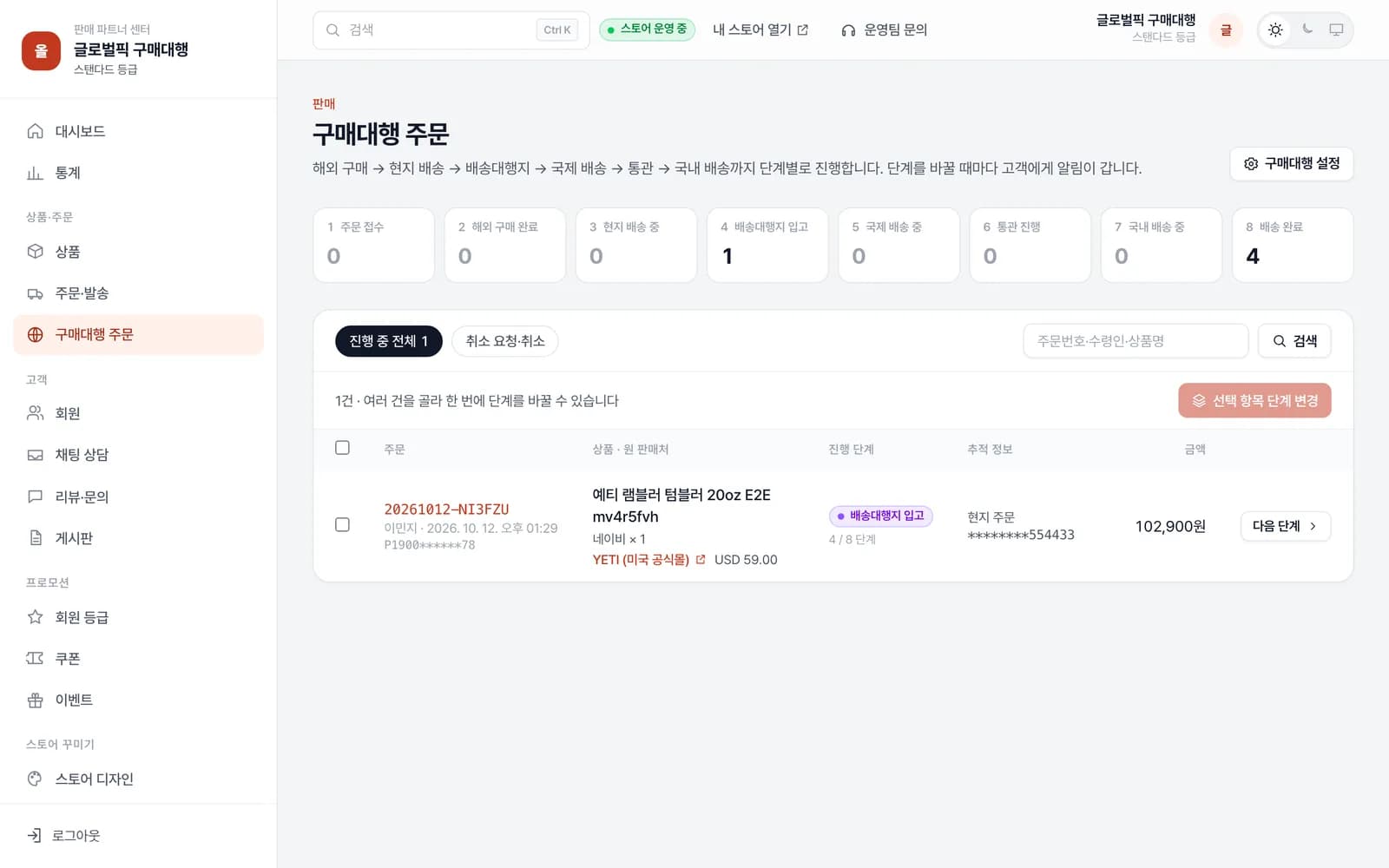
From order received to overseas purchase, local shipping, international shipping, customs and domestic delivery, the customer is notified at each stage change.
What you can do once approved
Automatic selling price
Local price × exchange rate + agency fee + international shipping (+ estimated duties and VAT), rounded up to ₩100. Exchange rates are entered by the store.
Customs information
The order form collects the personal customs clearance code and checks its format.
Sold-out items and extra payment
If an item sells out overseas, that item is cancelled and refunded. If the local price or shipping changes, request an extra payment with the amount and reason; the customer pays from their order history. If the order is cancelled, the extra payment is refunded with it.
What you need to apply, and the review
Fields and documents come from the same definitions as the real application form.
- An email and password for sign-in
- Business registration number, representative and business address
- Business registration certificate file
- Mail-order business report number and certificate file
- Countries you buy from
| Item | Required? |
|---|---|
| Business registration number | Required (10 digits) |
| Business registration certificate | Required |
| Mail-order business report certificate | Required |
Document files: PDF, JPG, PNG or WebP, up to 10MB
How the review works
The Allday Allshopping operations team reviews it. The result is sent to the email you applied with, and in the meantime you can check progress with your application number on the status page.
Received → under review (missing documents can be added) → approved or rejected → if rejected, read the reason and resubmit under the same number
Day one · week one
What you get on day one
- The same partner center and store as a seller partner (business model: overseas purchasing agent)
- Purchasing-agent settings: exchange rates by currency, agency fee, international shipping by weight band, notices
- An order-progress screen for agency orders
First-week checklist
- Enter exchange rates per currencyThey don't update automatically; product pages show the rate date
- Set your agency feeA percentage or a flat fee per order
- Build the international shipping table by weight band
- Decide whether prices include estimated duties and VAT
- List productsEnter the local price and weight and the selling price is calculated
- Register your payout account
The checkboxes are for guidance; the actual work happens in the console.
Cost
- Sign-up and monthly fee
- There is no such fee item. A fee applies only to the amount sold.
- Sales fee (베이직 grade, default for new partners)
- Marketplace sales 12% · own-store sales 5% · external-channel sales 3%
- Payment (PG) fee
- 2.9% of the paid amount is deducted at settlement.
Numbers are read directly from the operating settings. The agency fee and international shipping are selling terms the agent sets in the store; the table above is what is paid to Allday Allshopping. See all fees
Worked example
- ₩100,000 sold in your store
- ₩100,000 − sales fee ₩5,000 (5%) − payment fee ₩2,900 (2.9%) = ₩92,100
- ₩100,000 sold on the marketplace
- ₩100,000 − sales fee ₩12,000 (12%) − payment fee ₩2,900 (2.9%) = ₩85,100
- Sold through your own connected Smart Store or Coupang account
- No Allday Allshopping fee (settled by that channel)
On the 베이직 grade (default for new partners). A simple calculation without shipping, coupons or refunds, using the same formula as the settlement service (rounded to the won).
How is this different from the seller partner application?
Review and fees are the same. The mail-order business report certificate is required, and on approval the store's business model is set to overseas purchasing agency, which changes the product and order screens.
Do exchange rates update automatically?
No. Rates are entered in the store settings and are not refreshed automatically. The product page shows the date of the rate.
Who pays duties and VAT?
The store setting decides whether the selling price includes estimated duties and VAT. If not, a notice says the customer pays them at customs.
Which currencies are supported?
US dollar, yen, euro, pound, yuan, and Australian, Canadian and Hong Kong dollars.
Which stages do customers see?
Order received → purchased overseas → local shipping → arrived at the forwarding warehouse → international shipping → customs → domestic delivery → delivered; customers are notified at each change.
What if the item sells out or the price rises?
Sold-out lines are cancelled and refunded. If the local price or shipping changes, request an additional payment with the amount and reason; the customer pays from the order history. If the order is cancelled, the extra payment is refunded too.
How is customs information collected?
The checkout collects the personal customs clearance code and checks its format.
Are Allday Allshopping fees the same as for seller partners?
Yes — the same grade sales fees and payment fee. Your agency fee and international shipping are terms you charge customers, separate from Allday Allshopping fees.
Is a mail-order business report certificate required?
Yes, for purchasing-agent applications. It must be attached together with the business registration certificate.
Purchasing agent applications are filed online
You receive an application number by email and can follow progress on the status page. If an application is returned, you can correct it and resubmit under the same number.