Seller partner guide
Open a store under your own name and ship orders yourself
A seller partner is given a store of their own on Allday Allshopping. Shape it around whatever you sell — fashion, beauty, living, food, digital and more — and show the products on the main marketplace too. When an order comes in, the partner ships directly to the customer.
Who this is for
- Brands and makers who sell products they make or design
- Distributors and suppliers who gather products from several sources
- Businesses that want one more sales channel next to their existing shop
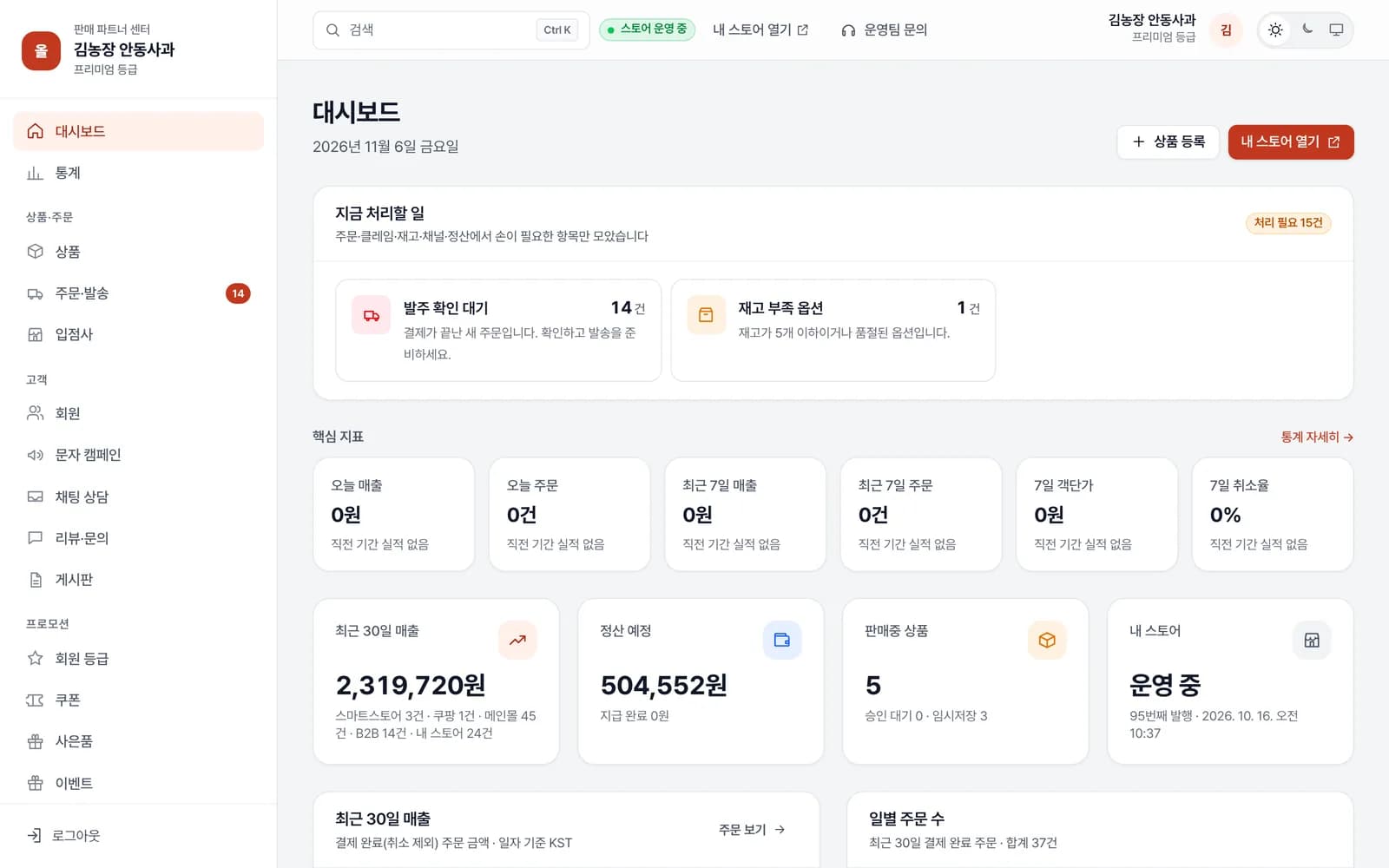
How it works
Step 1
Submit the application
Enter your account, store name and address and business details, and attach your business registration certificate.
Step 2
Review by the operations team
The team checks the information and documents and emails the result. If the application is returned, the reason is given and you can correct it and resubmit.
Step 3
Store provisioning
On approval a store is created by copying a template. Sign in to the partner center to set up your brand and screens.
Step 4
List products
Register products one by one or in bulk with an Excel or CSV file (up to 20,000 products per file by default). Depending on the grade they go live after review or immediately.
Step 5
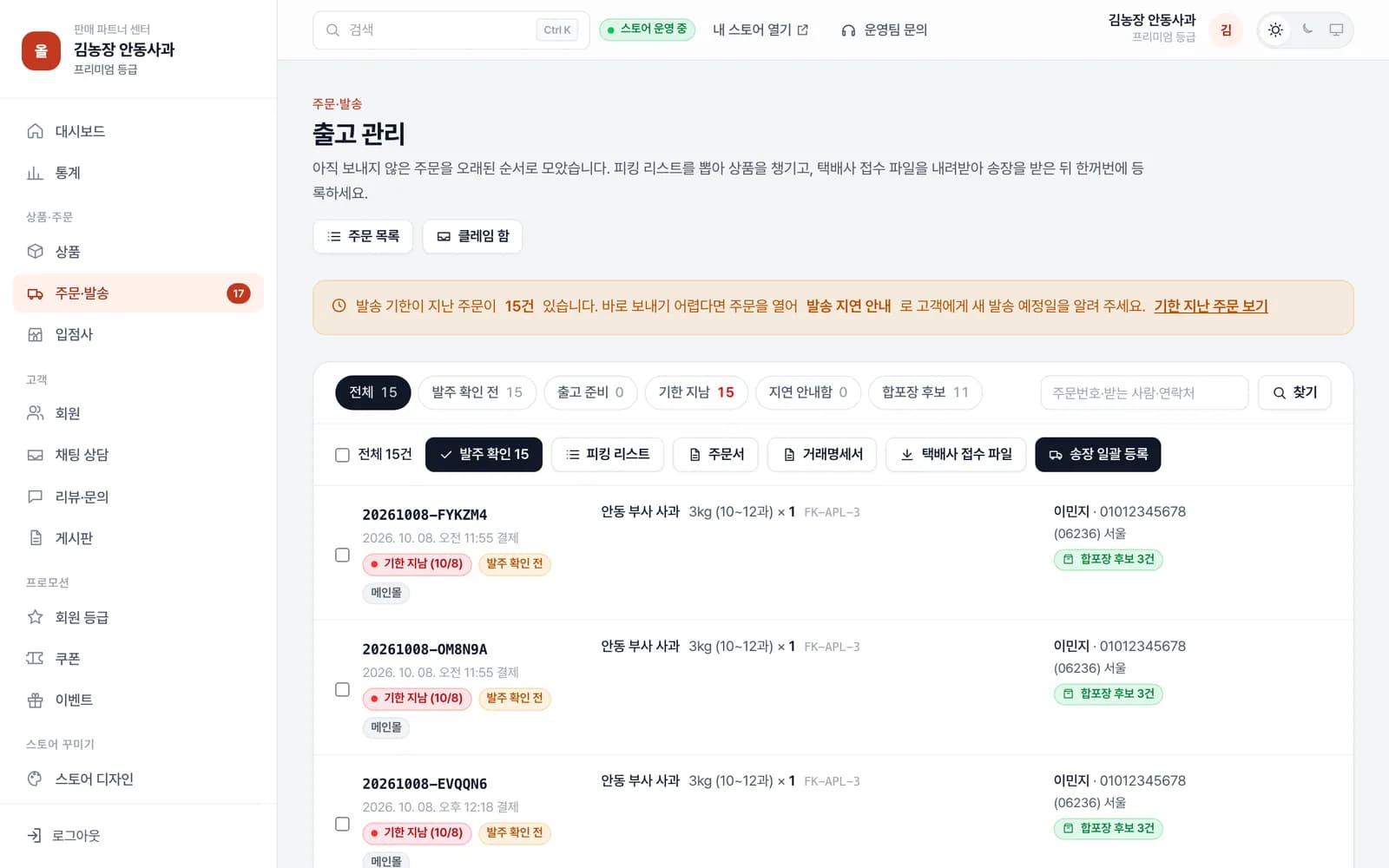
Fulfil orders
The shipping queue shows orders by how close their shipping deadline is. Enter tracking numbers one by one or in bulk from a file and the customer is notified. You ship the order yourself and pick the delivery method (carrier) from a list; large items can go by freight and installation delivery, items you hand over yourself go as direct delivery without a tracking number, and with store pickup turned on customers can collect at your store with no shipping fee.
Step 6
Settlement
Confirmed orders are grouped into a statement with per-channel fees and paid to your registered account.
What you can do once approved
Orders, shipping and stock
Print picking lists, order sheets and transaction statements, download carrier booking files, upload tracking numbers in bulk, send shipping-delay notices, adjust stock per option with a history, and work through cancellation, return and exchange requests in a claims inbox. The default addresses in your ship-from and return address book go into customers' return instructions and shipping documents. For couriers with automatic lookup, tracking history and delivery update by themselves, and store pickup orders go from ready for pickup to picked up by customer.
Chat support
Answer chat questions customers send from product and order screens in the partner center inbox. You can also message the Allday Allshopping operations team from the partner center.
Templates and code editing
Start from a template, change screens with the block editor, and edit the HTML theme code directly when needed. The design state can be backed up and restored.
Extension market
Install theme packs, page packs, section widgets and feature extensions. A pack is previewed first, applied to the draft only, and can be reverted. You can browse what is published before applying.
General-merchandise listing
Pick from 17 top-level and 141 categories and the fields for that kind of product (size, color, volume, model name and so on) and the disclosure form (28 types) follow, with a VAT-type suggestion by category. Excel and CSV bulk upload takes plain Korean values for VAT type and visibility, offers drop-downs for category and shipping-fee policy, and handles up to 20,000 products per file by default through check, review and apply. Photos written as image addresses are copied into your storage, and downloading your products, editing them and uploading again makes a bulk edit.
Custom domain and 7 languages
Connect your own domain instead of the store address (depending on the grade), and turn on the languages you use from Korean, English, Japanese, Chinese (Simplified and Traditional), Vietnamese and Thai to translate products, options and categories right in the edit form.
International shipping and foreign-currency payment
Once the operations team opens international shipping, set per-zone shipping rates, an international courier, transit days, overseas return and exchange fees and customs defaults to take overseas orders. Print commercial invoices; even when customers pay in a foreign currency, you are settled in won.
Promotions and gifts
Run member grades, coupons, events and time sales per store. Gifts with purchase set gifts per amount tier (with a choice and a stock limit), remind customers who are short when they press the buy button, and print the chosen gift on picking lists and order sheets. If a partial refund drops an order below its tier, the gift is flagged as needing recovery (no automatic charge).
SMS campaigns and member links
Under customers › SMS campaigns, choose recipients by grade, purchase segment or join date, and per-member links are made only for your own store's members who agreed to promotional texts and have a mobile number (link a coupon and each also gets a personal code only they can use). Download them as a spreadsheet with the personalised message text and send it through the SMS service you use (Allday Allshopping does not send the texts itself); then see who tapped and which products and categories they viewed, by campaign, member and product. Members who opted out are left out automatically at download.
Brand picker
In the product form's brand field, search the brand list the operations team keeps and pick one. If it is missing, request it as a new brand and it is picked straight away; once the operations team approves it, it appears in the marketplace brand directory and as a brand link on product pages. If a brand with the same name already exists, that brand is picked.
Analytics
See sales, product, customer, fulfilment, visit and chat-support analytics by period.
Sales channels
Install connectors from the extension market to sell through open markets and product feeds.
AI assistant
Help with filling in product details from photos, detail page drafts and per-channel main images, plus product, sales-channel, inquiry and store-detail work by chat. It handles your own store's data only, changes run after you review the plan, and charges come from prepaid credits for what you use.
Vendors and B2B supply
With the vendor pack installed, other suppliers can sell in your store, and you can supply your products wholesale to B2B buyers. For B2B supply, set a wholesale price (per option if you like), minimum order quantity, dispatch days and whether you ship directly to the buyer's customers on products you have on sale; buyer orders arrive as ‘B2B’ channel orders and ship as usual. Orders placed on credit are, by default, settled after purchase confirmation once the buyer's payment has been collected (the platform operator bills and collects from buyers).
Store member management
See each store member's cumulative spend (net of refunds) and number of orders, pick members by purchase-behaviour groups such as repeat or lapsed customers, and change grades, issue coupons, grant or deduct points or download a spreadsheet in one go. Leave notes on members that only your staff can see.
Reviews, questions and boards
See unanswered product questions and reviews in one place and give several the same answer at once. Add notice, FAQ, question and gallery boards to your store and answer waiting posts straight away.
Supplier feeds and bulk edits
Register a supplier's product feed address to bring in products, prices and stock on a schedule, and change the price (by percentage or amount, with tidy last digits), stock, categories and tags of many products at once. Prices below cost or that lose money after fees need your confirmation before saving.
What you need to apply, and the review
Fields and documents come from the same definitions as the real application form.
- An email and password for sign-in
- Business registration number, representative and business address
- Business registration certificate file (PDF, JPG, PNG or WebP, up to 10MB)
- Mail-order business report number and certificate (if you have one)
| Item | Required? |
|---|---|
| Business registration number | Required (10 digits) |
| Business registration certificate | Required |
| Mail-order business report certificate | Optional |
Document files: PDF, JPG, PNG or WebP, up to 10MB
How the review works
The Allday Allshopping operations team reviews it. The result is sent to the email you applied with, and in the meantime you can check progress with your application number on the status page.
Received → under review (missing documents can be added) → approved or rejected → if rejected, read the reason and resubmit under the same number
Day one · week one
What you get on day one
- The partner center, signed in with the email you applied with
- Your store, copied from a template, at the address you chose
- The default grade for new partners, with its fees and storage
- 'For first-time users' guides and help on each screen, and the operations-team chat at the top
First-week checklist
- Check your store informationSettings › store information: business name, representative, address and customer-service contact (shown in the store footer and on product pages)
- Register your payout accountSettlement screen, after re-entering your password
- Create a shipping policyBase fee, free-shipping threshold, remote-area and Jeju surcharges, return and exchange fees, dispatch days and cut-off time
- Register ship-from and return addressesShipping policies › ship-from and return addresses: the default return address goes into customers' return instructions, the default ship-from address into labels and statements
- Dress up and publish your front pageStore design and pages → preview → publish
- List a few products and request approvalCategory → attributes and disclosure → save and request approval (use the spreadsheet upload for many)
- Set chat hours and the away messageChat settings: hours, away message, quick questions
- (Optional) Connect a sales channel and test itInstall a connector → connection check → dry run
- (Optional) Invite staffBy email; role and menu permissions apply when they accept
The checkboxes are for guidance; the actual work happens in the console.
Cost
- Sign-up and monthly fee
- There is no such fee item. A fee applies only to the amount sold.
- Sales fee (베이직 grade, default for new partners)
- Marketplace sales 12% · own-store sales 5% · external-channel sales 3%
- Payment (PG) fee
- 2.9% of the paid amount is deducted at settlement.
Numbers are read directly from the operating settings. All grade rates are on the fees page. An individual contract rate takes precedence. See all fees
Worked example
- ₩100,000 sold in your store
- ₩100,000 − sales fee ₩5,000 (5%) − payment fee ₩2,900 (2.9%) = ₩92,100
- ₩100,000 sold on the marketplace
- ₩100,000 − sales fee ₩12,000 (12%) − payment fee ₩2,900 (2.9%) = ₩85,100
- Sold through your own connected Smart Store or Coupang account
- No Allday Allshopping fee (settled by that channel)
On the 베이직 grade (default for new partners). A simple calculation without shipping, coupons or refunds, using the same formula as the settlement service (rounded to the won).
How long does approval take?
The operations team checks the documents and emails you. The result is sent to the email you applied with. You can follow progress any time on the application status page with your application number, and if the application is returned you can correct it and resubmit under the same number.
Are my products shown on the marketplace too?
For each product you choose where it is shown: marketplace and store, store only, or marketplace only. The sales fee is the rate of the channel where the sale happened.
Who ships?
The seller partner who listed the product ships it. Shipping policies (base fee, conditional free shipping, quantity bands, bundling, island and Jeju surcharges, a regional surcharge table by postcode prefix, a free shipping event period, return and exchange fees) are set by the seller under shipping and operations policies in the partner center.
How is the grade decided?
New partners start on the default grade; grades and individual rates are adjusted by the operations team. Fees, custom domains and storage depend on the grade. The monthly free AI allowance follows a platform default set by the operations team and can be set differently per grade or per store.
Which account is settlement paid to?
You register a payout account in the partner center after re-entering your password. The operations team verifies the account and, depending on the operating settings, payouts may be made only to verified accounts. In that case the settlement screen shows the account as awaiting verification.
Can staff work with me?
Yes. Invite staff by email; they are connected only when they accept (invitation links expire after seven days by default), and their role and menu-by-menu permissions apply on acceptance. Changes made by staff are kept in an activity log.
Is a mail-order business report required?
It is optional on the form. Online selling can still require one under Korean law, so check what applies to your business. The business details you enter are shown in the store footer and on product pages.
Do products show as soon as I list them?
It depends on the grade: some grades go live after review by the operations team, others immediately. The current setting is in the 'Listing' column of the grade table on the fees page.
When do I get paid?
Settlement is monthly. Orders confirmed from the 1st to the last day of the month (Korea time) form one statement; after the period ends the operations team closes it and pays to your registered account. The payout date is shown on the settlement screen once the operations team completes the transfer. Orders are confirmed by the customer or automatically 7 days after delivery.
Do orders from my own Smart Store or Coupang carry a fee?
No. Orders from a channel account you connected yourself are settled by that channel, so there is no Allday Allshopping fee and they are not on your statement. Shipping, stock and claims are handled in the partner center as usual.
How many products can I list?
There is no set cap. Photos and files count towards your grade's storage, and a spreadsheet upload takes up to 20,000 products and 50,000 rows per file by default.
Can I take my data if I leave?
You can download products (spreadsheet), orders, members, reviews, inquiries, coupons and statement details (CSV). The store owner ends the contract themselves in Partner center › Settings › End partnership. The screen first shows what blocks it (open orders, claims, unpaid settlement), what will be deleted and what is kept by law, then asks for your password and store name. The store closes immediately and can be restored during a 30-day grace period; after that the store, products, photos and channel connections are deleted, while order, payment and settlement records are kept for the legal period with personal details masked.
Seller partner applications are filed online
You receive an application number by email and can follow progress on the status page. If an application is returned, you can correct it and resubmit under the same number.