Affiliate partner guide
Share referral links and earn a commission each time a sale is confirmed
An affiliate partner creates referral links to products, categories and stores and posts them on their own channels. When an order from a visitor who followed the link is confirmed, a commission accrues for each order line.
Who this is for
- People who run a blog or social channel about fashion, beauty, home, cooking or tech
- Communities and newsletters that want to introduce good products
- Marketers who want to see results per link across several channels
How it works
Step 1
Submit the application
Enter your account, activity name, referral code and promotion channels.
Step 2
Review by the operations team
The team checks your channels and emails the result.
Step 3
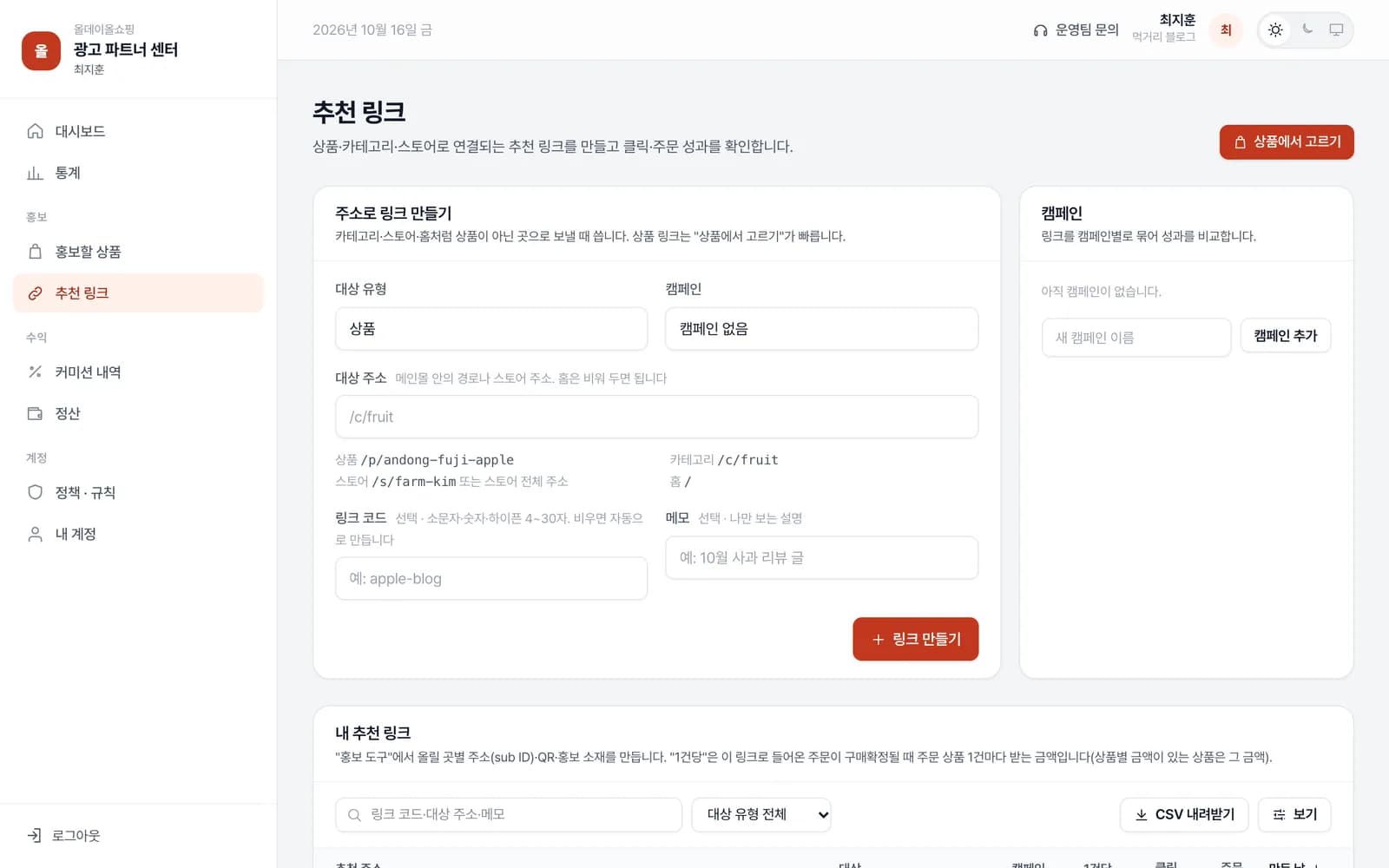
Create referral links
In the affiliate center, pick products to promote and create links; each product shows the commission you would earn. Links to a category, store or the home page are also possible, and links can be grouped into campaigns.
Step 4
Make a share address per placement
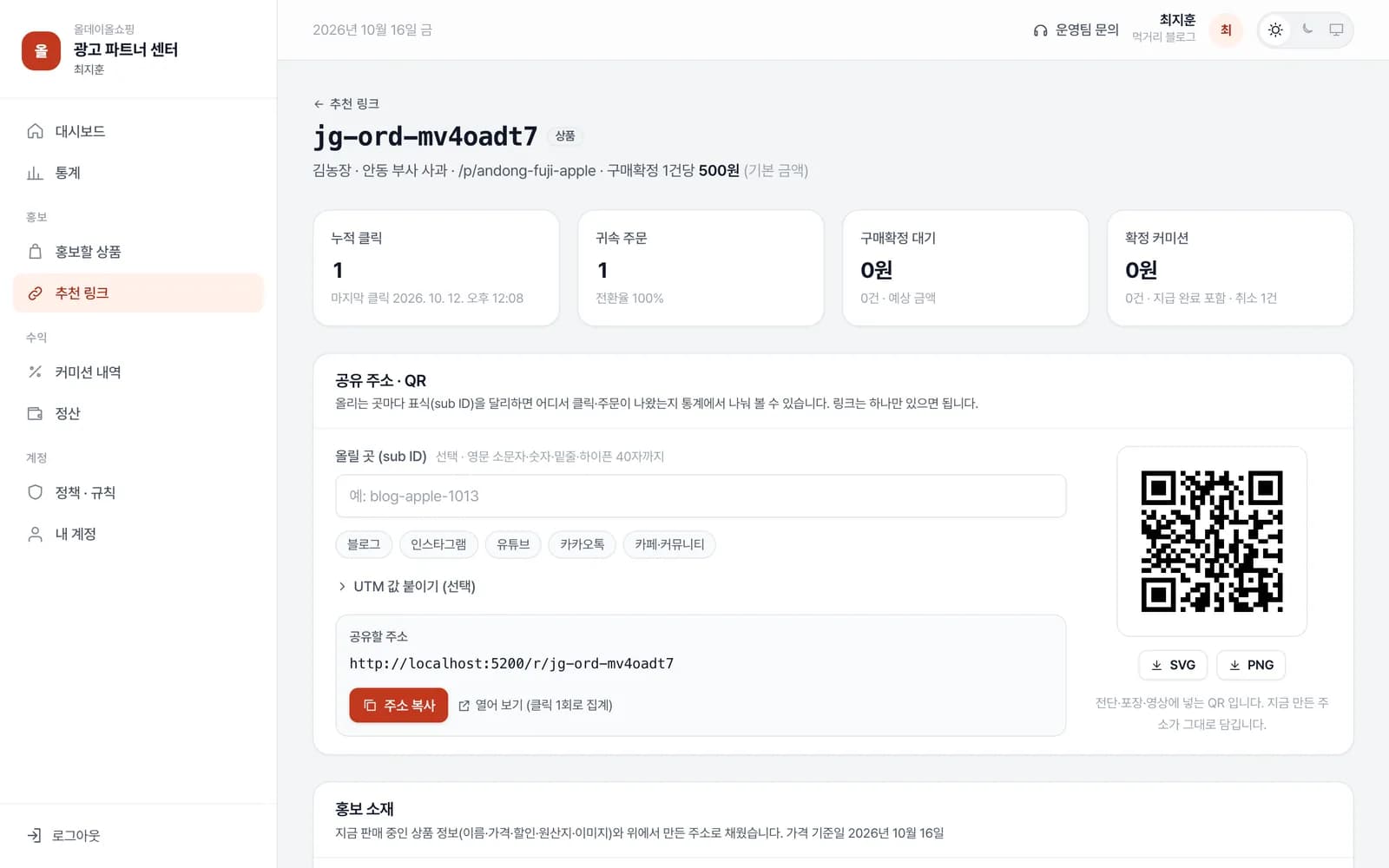
Create one link, then make a share address and QR code for each place you post it, tagged with a sub ID and UTM values. You can see which placement produced the orders.
Step 5
Attribution
If a visitor orders within the attribution window after following a link, the order is credited to the partner of the last link followed.
Step 6
Commission and settlement
The commission on an attributed order starts as pending, becomes confirmed when the order is confirmed, and becomes paid when the statement is paid out. Payouts follow the settlement cycle to the account registered in the affiliate center. Commissions on cancelled or returned orders are cancelled, even after payout, and deducted on the next statement.
What you can do once approved
Promotion tools
For each link: build share addresses, download a QR code (SVG or PNG), and see cumulative results per placement on one screen.
Promotional copy
From a product link, generate a social post, a messenger or community post, blog HTML and banner code using the real product name, price and photo. An advertising disclosure line is placed at the start of every piece and cannot be removed. The generated copy is in Korean.
Results per link and the visit funnel
See clicks and attributed orders by link, campaign, product and placement, and follow the funnel from click to store arrival, product view, cart and order.
Commissions and statements
Check pending, confirmed, paid and cancelled commissions and the amount about to be confirmed, and print or export an itemised breakdown of each statement as CSV. You register your payout account in the center.
Policy page and notifications
The policy page shows the attribution window, commission rules and settlement cycle exactly as configured. Sales, commission confirmation and cancellation, statement closing and payouts are notified by email, and each kind can be switched off.
Message the operations team
Use the operations-team chat at the top of the affiliate center.
What you need to apply, and the review
Fields and documents come from the same definitions as the real application form.
- An email and password for sign-in
- Activity name and referral code (4–20 uppercase letters and digits)
- Description and address of your promotion channels
- Business registration number (optional)
| Item | Required? |
|---|---|
| Business registration number | Optional (if you have one) |
No documents to submit.
How the review works
The Allday Allshopping operations team reviews it. The result is sent to the email you applied with, and in the meantime you can check progress with your application number on the status page.
Received → under review (missing documents can be added) → approved or rejected → if rejected, read the reason and resubmit under the same number
Day one · week one
What you get on day one
- The affiliate center and the referral code you chose
- A policy screen showing attribution window, commission rules and settlement cycle exactly as configured
- A link builder that shows the commission for each product
First-week checklist
- Register your payout accountAffiliate center › settlement
- Create your first referral linkProduct, category, store or marketplace home; group links into campaigns
- Make share URLs and QR codes per place you postA sub ID and UTM per blog or social account
- Create promotional materialAn ad disclosure line comes first and can't be removed
- Choose notificationsSales, commission confirmed or cancelled, settlement closed, payout
The checkboxes are for guidance; the actual work happens in the console.
Cost
- Sign-up fee
- There is no such fee item.
- Commission
- ₩500 per confirmed order line (platform default). A product, campaign or partner amount applies when one is set.
Numbers are read directly from the operating settings. See all fees
Worked example
- One order with 3 × product A and 1 × product B
- 2 product lines × ₩500 = ₩1,000
- Quantity
- Not counted (3 × product A is one line)
- If the order is returned
- The commission is cancelled; if already paid, it comes off the next statement
Based on the platform default. Amounts set per product, campaign or partner take precedence.
How is commission calculated?
A fixed amount accrues for each confirmed order line. If an order has several different products, each counts once; quantity is not counted. The default amount follows the platform setting, and a different amount can apply per product, campaign or partner.
How long is the attribution window?
Orders within a set number of days after the click are attributed. The window is set per partner at approval and shown in the affiliate center.
Can individuals apply?
Yes. The business registration number is optional.
Which pages can I link to?
Products, categories, stores and the marketplace home page.
Are sales attributed by coupon code?
No. Sales are attributed only through recorded clicks on a referral link. Linking a coupon code to a partner is not offered.
How do I disclose advertising?
Copy generated in the center starts with an advertising disclosure line that cannot be removed. In text you write yourself, you must also state that the promotion is compensated, in line with Korean endorsement disclosure rules.
How is tax handled?
Statements do not calculate withholding or any other tax deduction; the statement breakdown says so. You need to handle tax matters yourself.
Do my own purchases count?
No. Orders from your own account are excluded. Attribution needs a real click within the window and goes to the partner whose link was clicked last.
When is commission confirmed?
When the attributed order is confirmed — by the customer or automatically 7 days after delivery. The affiliate center shows amounts about to be confirmed.
Affiliate partner applications are filed online
You receive an application number by email and can follow progress on the status page. If an application is returned, you can correct it and resubmit under the same number.