Skip to content
Allday Allshopping

Operations and trust

Clear settlement, safe data

Confirmed orders are grouped into statements with per-channel fees, and stores can never reach each other's data. Here is how we keep payments from going wrong and data from being lost — only what is actually built.

Settlement cycle: monthly
Orders confirmed from the 1st to the last day of the month (Korea time) are grouped together
Delivery + 7 days
Confirmed automatically 7 days after delivery if the customer doesn't
Last 4 digits only
Payout accounts are stored encrypted and changed after re-entering your password
Daily backups
With an automatic weekly drill that actually restores one

Settlement

Confirmed orders are settled with per-channel fees

Settlement is based on the moment an order is confirmed. The fee for each sales channel and the payment fee are calculated per item and recorded on the statement.

Settlement in the partner center

Statement items

A statement is built up item by item.

  • Sales: confirmed order items (channel fee and payment fee deducted)
  • Refunds: amounts cancelled or returned after settlement
  • Vendor commission: what a host store receives from its vendors' sales
  • Shipping: the shipping fee the customer paid (one line per order and seller group; refunded shipping is a negative line)
  • Platform discount compensation: when the platform bears marketplace coupons, points or member-grade discounts, that share is added back to you
  • Purchase-agency extras: additional payments on purchase-agency orders (extra shipping, duties and so on)
  • Carry-forward deduction: if last period's statement came to a negative total, it is not paid out and the same amount is deducted on this period's statement
  • Affiliate commission, market sales and commissioned work: settlement for affiliates and developers

Closing and payout

When a period ends the operations team closes it and pays out. The payout date is shown on the settlement screen once the operations team completes the transfer. Adjustments and holds are recorded on the statement with the reason.

Business days that know public holidays

The business-day calendar includes Korean public holidays (substitute holidays and election days included) by default, so payout dates and application review deadlines skip them without anything being entered. The operations team can add company holidays or switch off a single public holiday, and payout dates and review periods are shown on the application form and on each console's settlement screen.

Payout account

The payout account is registered in each console after re-entering the password, and a change history is kept. If an amount is due but no account is registered, that statement stays unpaid. The operations team verifies registered accounts, and when the ‘pay verified accounts only’ setting is on, statements for unverified accounts are left out of payouts and each console's settlement screen shows the account as awaiting verification (off by default).

Statement breakdown

A seller partner's statement items carry the order number, product and quantity and can be exported as CSV. Affiliates and developers can print or export an itemised breakdown of each statement.

Stages of an affiliate commission

The commission on an order attributed to a referral link goes from pending to confirmed (order confirmed) to paid (statement paid out), and is cancelled if the order is cancelled or returned. A commission cancelled after payout is deducted on the next statement.

B2B credit

B2B orders placed without payment inside the credit limit accumulate in a ledger and are grouped into invoices. The buyer pays through the portal or reports a bank transfer, which the operations team confirms. Under the default setting the amount enters the supplying partner's settlement after it has been collected.

Automatic confirmation

An order is confirmed automatically a set period after delivery and then becomes eligible for settlement.

Fees by grade

Read directly from the operating settings.

Fees are shown exactly as configured
GradeMarketplace salesOwn-store salesExternal-channel sales
베이직Default for new partners12%5%3%
스탠다드10%4%2.5%
프리미엄8%3%2%
엔터프라이즈6%2%1.5%
5 things to know
  • Only orders sold on Allday Allshopping carry a fee; orders from a sales channel you connected yourself are settled by that channel. They are marked ‘Settled by channel’ in the partner center order list and are not on the statement or payout.
  • Orders paid on an external channel do not pass through Allday Allshopping's payment, so refunds are handled on that channel.
  • Partners with an individual contract rate are charged that rate instead of the grade rate.
  • Statements do not calculate withholding or any other tax deduction, and tax invoices are not issued automatically.
  • The B2B billing cycle, due date and what happens when overdue (blocking new credit orders, late interest and so on) follow the operating settings and the terms set per buyer.

Analytics

From sales to visit flow, in the console

Each role has analytics in its own console. Choose a period, compare it with the previous one, and download the table.

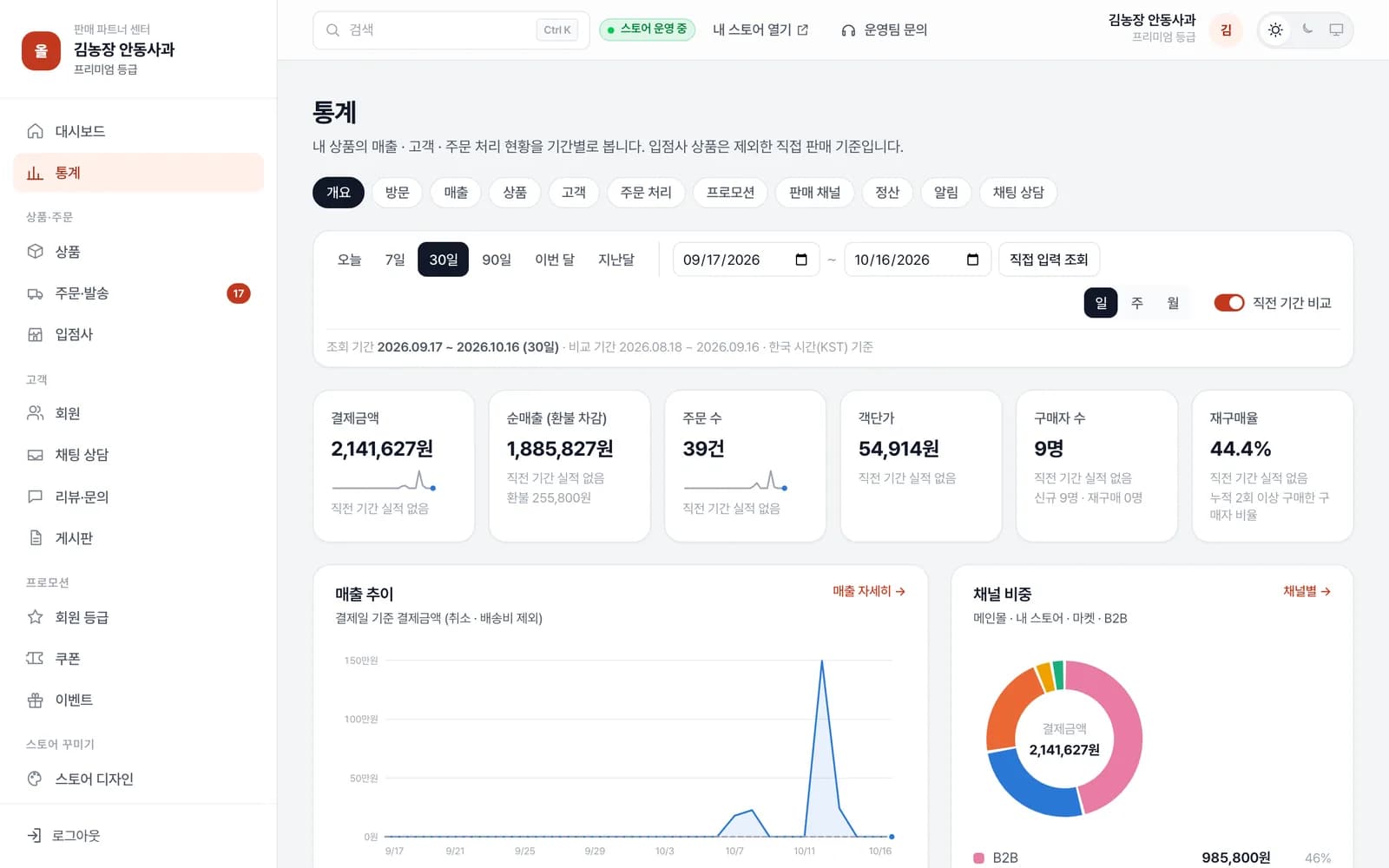
Analytics in the partner center

Seller partners

Sales and order trends with the share per channel, product ranking, new and returning customers, fulfilment time, coupon and event results, results per sales channel, and settlement amounts due, confirmed and paid.

Visit analytics

Visitors, traffic sources, search terms and the path from visit to purchase are counted without cookies. Visitors are told apart only by an anonymous value that changes daily, and raw IP addresses are not stored.

External analytics and advertising tools

GA4, Google Ads, Tag Manager, Meta Pixel, Naver Analytics and ad conversion, Kakao Pixel and TikTok Pixel are connected by entering a tracking ID. X, Pinterest and Clarity are used by installing a tracking integration from the extension market. Turning a tool on also turns on the cookie consent banner, and no external script is loaded until the visitor consents.

Chat-support analytics

Conversations, first-response time, response rate, resolution time and satisfaction, broken down by product, inquiry type, hour and agent, with CSV export.

Statistics by member grade

The grade statistics under promotions › member grades show, for each grade, how many members hold it now, how many bought in the period, spend (net of cancellation and return refunds), number of orders, and averages per member and per order, with Excel and CSV export. Periods are all time or the last 1, 3, 6 or 12 months; member counts use each member's current grade.

Notification delivery statistics

Under analytics › notification delivery statistics, see the notifications your store sent to customers (orders, shipping, sign-up and so on) by channel (email, KakaoTalk notification, text) and by type. Check sent, failed and pending counts over time, the failure rate, and the most frequent errors grouped by message.

Other roles

Vendors see sales and settlement for their products. Affiliates see clicks and orders by link, product, placement (sub ID) and UTM, the visit funnel from click to order, and commission. Developers see installs and sales, per-version status, API usage, commissions and settlement; B2B buyers see purchase trends, selected products and credit-limit use.
3 things to know
  • External analytics and advertising tools have not been confirmed with real provider accounts. Only the script and call format were verified, so check in each tool's own console that data arrives after connecting.
  • The purchase event is sent once per order. Names, contact details and addresses are not sent to external tools.
  • The affiliate visit funnel counts clicks from 13 October 2026 onward. Automated browsers and bots are filtered out of visit analytics, so visits are lower than clicks.

Security and operations

Each store is isolated, and changes are recorded

Many businesses share one platform, so two things come first: no store can reach another's data, and it is recorded who changed what.

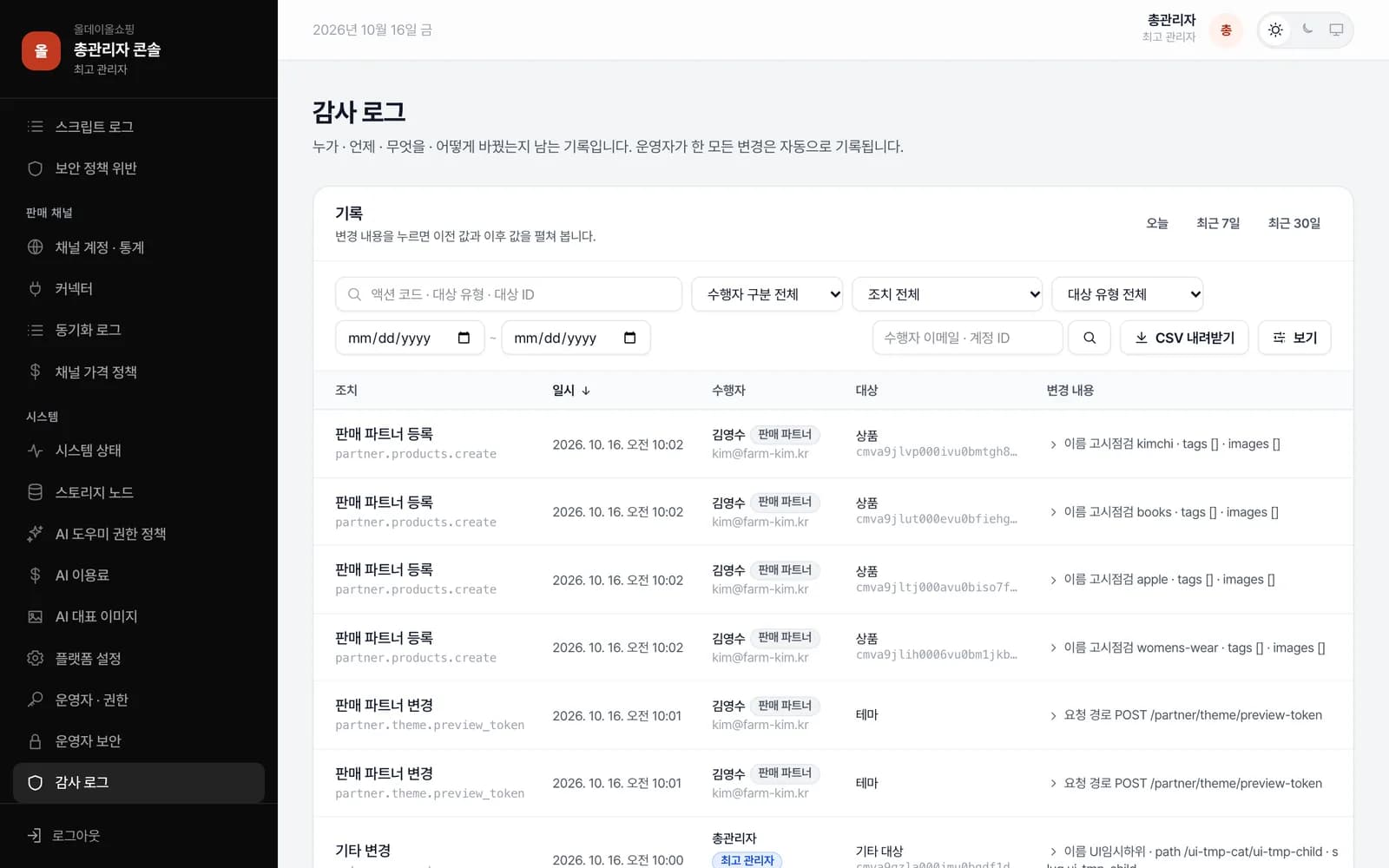
Audit log in the administrator console

Store isolation

Every edit and query happens within the store of the signed-in account. Another store's data is answered as not existing. Store files are kept under per-store storage paths.

Accounts and sessions

Repeated sign-in failures lock the account for a while, and sessions on other devices can be ended from the sign-in history. Staff accounts are given permissions per menu, and changes made by staff are kept in the store's activity log. Staff are invited by email and are connected only when they accept (invitation links expire after seven days by default; the operating policy can change this); role and permissions apply on acceptance.

Stronger sign-in security

The proof of sign-in is signed with a private key held only by the part that handles sign-in; every other service and screen can only check it with a public key. So even if settings elsewhere leaked, no one could forge a sign-in, and replacing keys does not sign users out.

Operator security

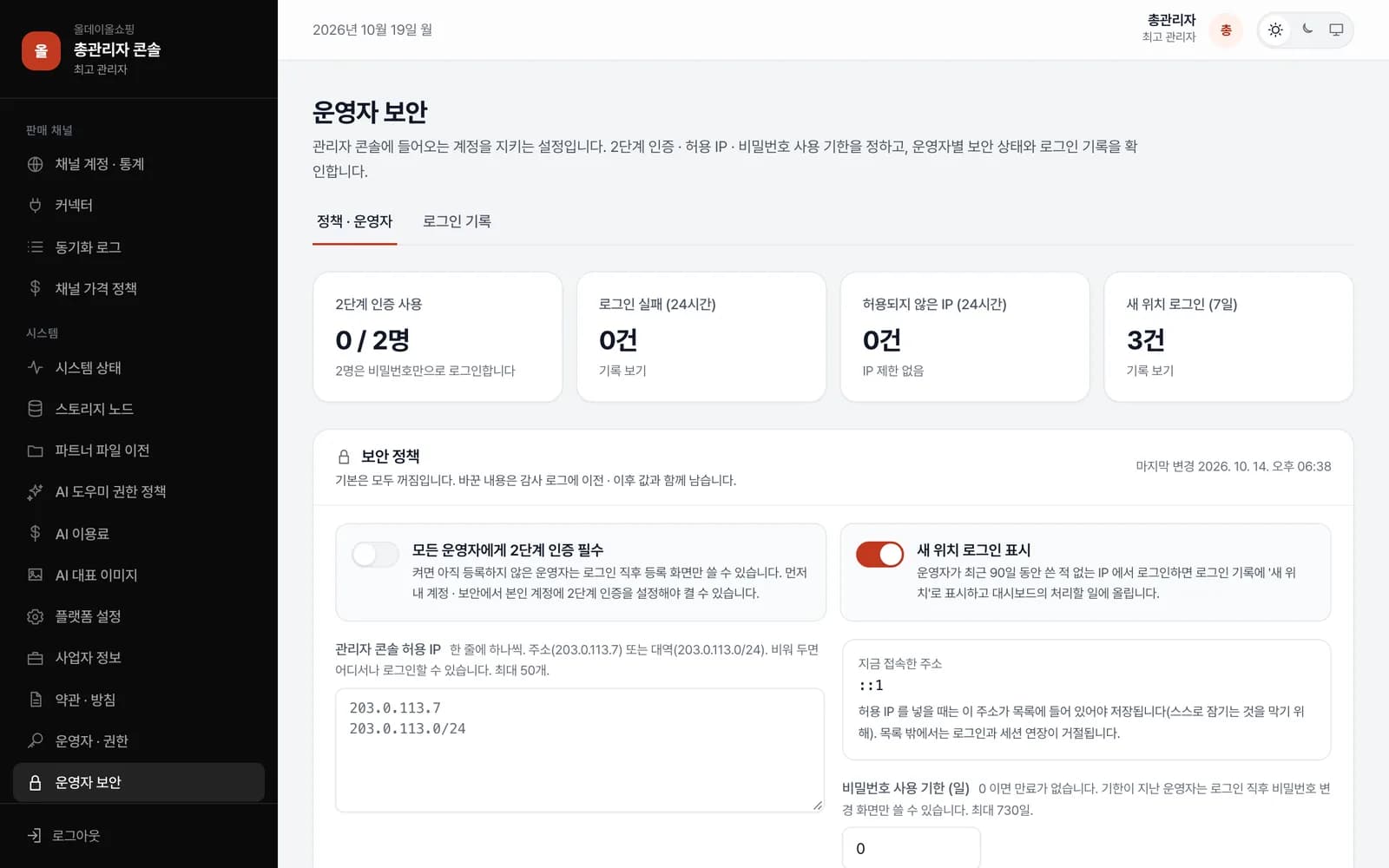
The admin console supports two-step sign-in with an authenticator app and recovery codes, and a policy can require two-step sign-in, restrict access to allowed IP addresses and set a password lifetime. Successful and failed sign-ins and sign-ins from a new location are recorded. By default two-step sign-in is optional and there is no IP restriction.

System status and notices

The operations team sees service responses, pending work, scheduled jobs and storage status on one screen and re-runs failed jobs. Maintenance and changes are announced to chosen audiences in a notice at the top of each console. A separate screen checks that payment and settlement totals match.

Input and integration safety

HTML entered in editors is sanitised, and features that call external addresses block internal-network addresses. Channel credentials are stored encrypted and webhooks are signed.

Records and permissions

Operating actions such as approvals, rejections, setting changes and document views are written to the audit log. Operators receive only the permissions their work needs.

Application documents

Documents submitted with an application, such as a business registration certificate, are kept in a private store separate from public storage and opened only by operators with review permission.

Notifications

Order, shipping and review notices are sent by email and, where configured, by KakaoTalk notification or SMS. A store can use its own sender name and wording. Seller partners choose which work notices they receive, such as new orders, claims, inquiries and low stock.

3 things to know
  • Payments, email and SMS, parcel tracking and social sign-in work only when each provider's keys are configured in the operating environment.
  • This does not mean a security certification (such as ISMS) has been obtained. What is written here is behaviour implemented in the product.
  • Two-step sign-in exists for operator accounts in the admin console. Partner, affiliate, developer and B2B console accounts do not have it yet.

Reliable operations

Keeping payments straight and data safe

Partners' sales and customers' payments depend on it, so the first rule is that nothing goes wrong silently. This page lists only what is actually built into the product and its operating tools.

Reliability: payment recovery, monitoring and alerts, backups and restore drills, multiple servers
  • Payment recoveryA payment whose response is slow is neither closed as failed nor refunded automatically; it is checked again with the payment provider and settled correctly.
  • Monitoring and alertsEvery server is checked every five minutes, and the operations team is emailed when a problem starts or clears.
  • Backups and restore drillsData is backed up daily, and a weekly drill automatically restores a backup to prove it works.
  • Spread across serversEach program can run as several copies that share the work, and scheduled jobs are arranged to run only once.

Payment recovery

If the payment provider's approval response is slow or cut off, the result is kept as ‘needs checking’ instead of being closed as failed. Retrying the same payment never approves it twice, and a scheduled job asks the provider again and settles the record.

  • A slow response while confirming the order does not trigger an automatic refund; it is checked again at growing intervals
  • Automatic cancellation or refund happens only when the order side clearly rejects it
  • Stuck refund requests are retried as the same request, preventing double refunds
  • Payments and refunds are reconciled with the settlement ledger every ten minutes; serious mismatches stop payouts until the operations team checks them

Monitoring and alerts

Every server checks disks, running programs, pending work, database connections, certificate expiry and backup times every five minutes, and emails the operations team when a problem starts, gets worse or clears. Alerts are sent in a way that works even while services are down.

Daily backups, weekly restore drills

The database is backed up daily and file storage is copied incrementally. Once a week the latest backup is actually restored into a temporary database and the counts of key records are compared with the live system, with an alert on failure. An encrypted second copy can also be kept somewhere else.

Spread across servers

Each service can run as several copies that share requests; if one stops, another takes over. Heavy work such as main-image generation is shared across several servers, and scheduled jobs such as settlement run only once even with several servers.

Room to grow for files

As a partner's photos and files grow, the operations team can move that partner's files to another storage server. New uploads go to the new server right away, existing files are copied and checked before their addresses switch, and old addresses still lead to the new ones.

Demo server and pre-release checks

The demo server, where anyone can try the seller, customer and partner screens, runs on a separate server and address from production. Every screen carries a ‘demo server’ banner, payments are simulated so no money moves, and it is reset to its starting state every day. Before a new version goes to the production server, the screen apps are built under the same conditions as production as a check.

Security basics

Sign-in, sign-up and application requests are rate-limited, and internal headers coming from outside are discarded. Uploaded files are identified by their actual content rather than their extension, and formats that can carry scripts are refused. The platform admin console supports two-step verification and an IP allowlist.

  • Store isolation and audit records are covered under ‘Security and operations’

Trust information customers see

The marketplace footer shows the operator's company name, representative, business registration number (with a lookup link), mail-order registration number, address, support desk and privacy officer exactly as entered, and product pages show the seller's business details.

  • Terms and the privacy policy show their version and effective date, earlier versions can be opened, and upcoming changes are announced before they take effect
  • Products and sellers flagged as test data are left out of customer lists, search, recommendations, sitemaps and product feeds
  • Certification details in detail pages are filled in automatically only when a certificate number is found in the product data
  • The marketplace FAQ covers cancellation, returns, refunds, shipping, purchase confirmation and payment as the policies actually work
4 things to know
  • The multi-server setup has been verified by running several copies in a test environment; failover across real separate servers has not been tested yet.
  • The second, off-site backup copy is off by default and works only once the operations team sets a storage location.
  • This does not mean a security certification (such as ISMS) has been obtained; it describes what is implemented in the product and its operating tools.
  • Products flagged as test data still open from a direct address and are hidden from search engines.

See it on screen

Real partner-center screens with example data. The numbers match the notes below.

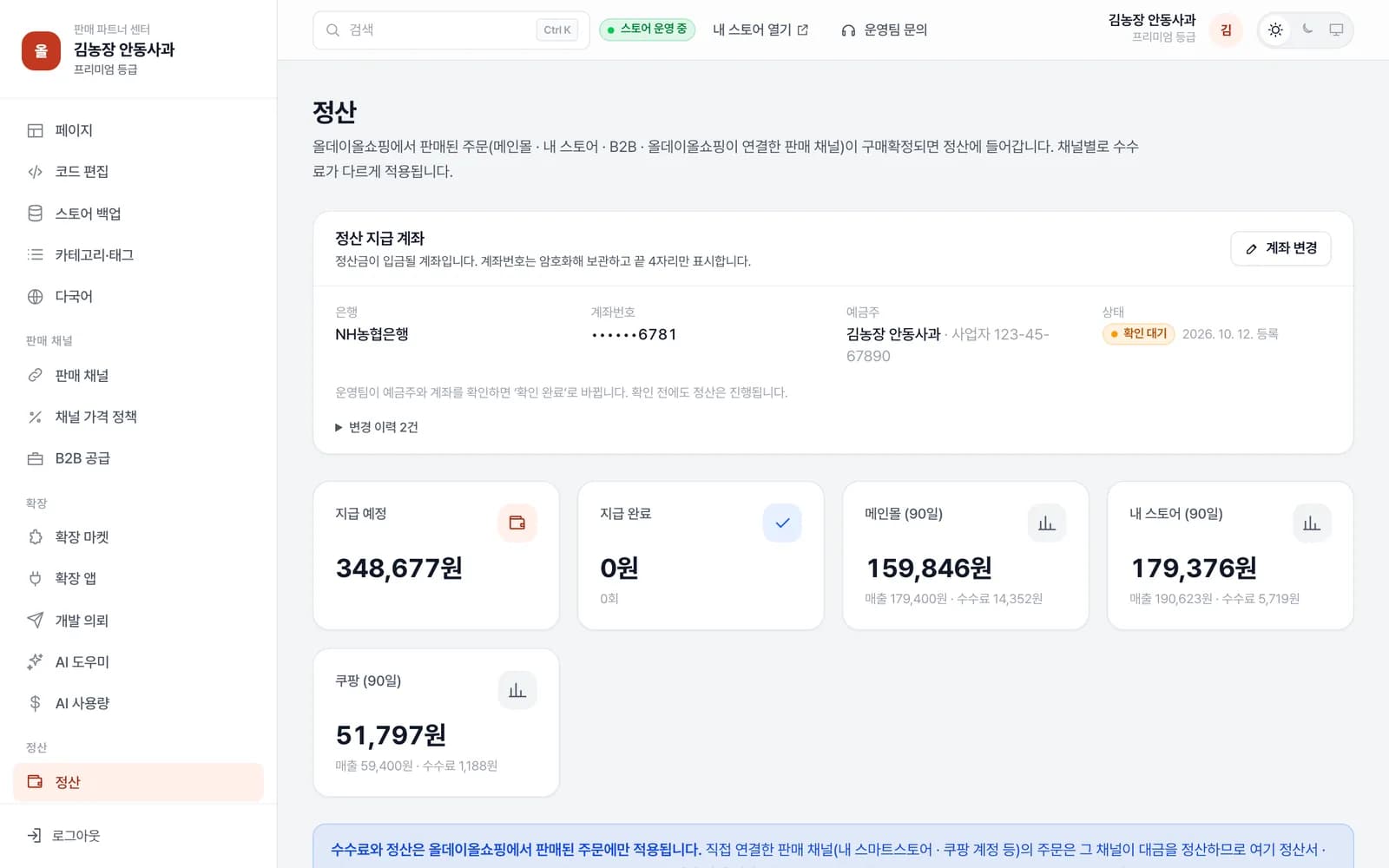
The settlement screen: payout account and verification status, scheduled and paid amounts, 90-day sales and fees for the marketplace, my store and Coupang
  1. Payout account — The account number is stored encrypted and only the last four digits are shown. Changing it requires your password again and is logged.
  2. Account check — Turns to 'verified' once the operations team checks the holder and account. With default settings, settlement goes ahead before that.
  3. Scheduled and paid — What you'll receive next and what you've received so far.
  4. Last 90 days by channel — Sales and fees split by marketplace, your store and platform channels. Each statement has an itemised CSV with order numbers, products and quantities.
Operator security in the admin console: two-step sign-in use, failed sign-ins, unknown IPs, new-location sign-ins and the security policy

How you use it

Step by step, using the real menu names.

When is an October sale paid out?

  1. Order and shipping — the customer pays and you enter the tracking number
  2. Delivered — courier tracking marks it delivered (untracked deliveries count as delivered 7 days after dispatch)
  3. Confirmed — the customer confirms, or it is confirmed automatically 7 days after delivery
  4. Settlement period — it lands, with fees, on the statement for the settlement period in which it was confirmed (orders confirmed from the 1st to the last day of the month (Korea time))
  5. Close and pay — after the period ends, the operations team closes it and pays to your registered account

Result: With monthly settlement, an order delivered at the end of October that is confirmed in November goes on the November statement. The payout date is shown on the settlement screen once the operations team completes the transfer.

Take your data with you when you leave

  1. Products — download the product list as a spreadsheet (options, attributes, disclosure and photo URLs included)
  2. Orders, members, reviews, inquiries, coupons: use each list's CSV download
  3. Settlement — download the itemised CSV of each statement
  4. Design — code-edited stores can export their theme files
  5. Closing — request it yourself in Partner center › Settings › End partnership after reviewing the pre-check (restorable for 30 days)

Result: The product export uses the same spreadsheet layout you can upload again.

Frequently asked questions

See all questions

When is my settlement paid?

Settlement is monthly. Orders confirmed from the 1st to the last day of the month (Korea time) are grouped into one statement; after the period ends the operations team closes it and pays to your registered account. The payout date is shown on the settlement screen once the operations team completes the transfer.

When is an order confirmed?

When the customer confirms it, or automatically 7 days after delivery. Deliveries that can't be tracked by tracking number (such as your own delivery) count as delivered 7 days after dispatch.

What if an item is returned after settlement?

Paid statements are never edited; the refund is deducted on the next open statement and marked as from an earlier period.

Do you handle tax invoices or withholding?

Statements do not calculate withholding or other tax deductions, and tax invoices are not issued automatically. Please check your own tax handling.

Can other stores see my data?

No. Every read and edit is limited to the signed-in account's store, and other stores' records answer as if they don't exist. Store files are kept under per-store paths.

How is customers' personal data protected?

Card and resident registration numbers typed into chat are masked before storage, and numbers that look like account numbers are hidden on screen, with a log when someone reveals them. Visit analytics use no cookies, only a daily anonymous value, and raw IP addresses are not stored. Names, phone numbers and addresses are never sent to external analytics tools.

Do partner accounts have two-step sign-in?

Not yet. Two-step sign-in exists only for operator accounts in the admin console. Partner accounts have lockout after repeated failed sign-ins, a sign-in history and the ability to end other devices' sessions.

Are you security-certified?

Nothing here claims a security certification such as ISMS. This page describes behaviour built into the product and the operations tools.

What happens to payout dates on public holidays?

The business-day calendar includes Korean public holidays (substitute holidays and election days included) by default, so payout dates and application review deadlines counted in business days skip them without any setup. If payouts fall on a fixed day of the month, moving to the previous or next business day on holidays follows the operating settings, and the operations team can add company holidays.

What happens to my data if I end the contract?

The store owner ends the contract themselves in Partner center › Settings › End partnership. The screen first shows what blocks it (open orders, claims, unpaid settlement), what will be deleted and what is kept by law, then asks for your password and store name. The store closes immediately and can be restored during a 30-day grace period; after that the store, products, photos and channel connections are deleted, while order, payment and settlement records are kept for the legal period with personal details masked. Before that you can download products (spreadsheet), orders, members, reviews, inquiries, coupons and statement details (CSV), and code-edited theme files.

Not sure where to start?

Pick what you want to do and we will point you to the right application. Ask the support desk if anything is unclear.